Diagnostic Indexes
The Diagnostic Indexes section shows the Sigmafine statistical tests (test1 � test4), calculated on each measurement and balance point in the Sigmafine model.
An additional set of diagnostics is dedicated to the overall Sigmafine model includes indexes (DX0 � DX4, Solvability and Redundancy degree) that help you gauge the overall quality of the reconciled results.
Diagnostic Panel example - Template tab
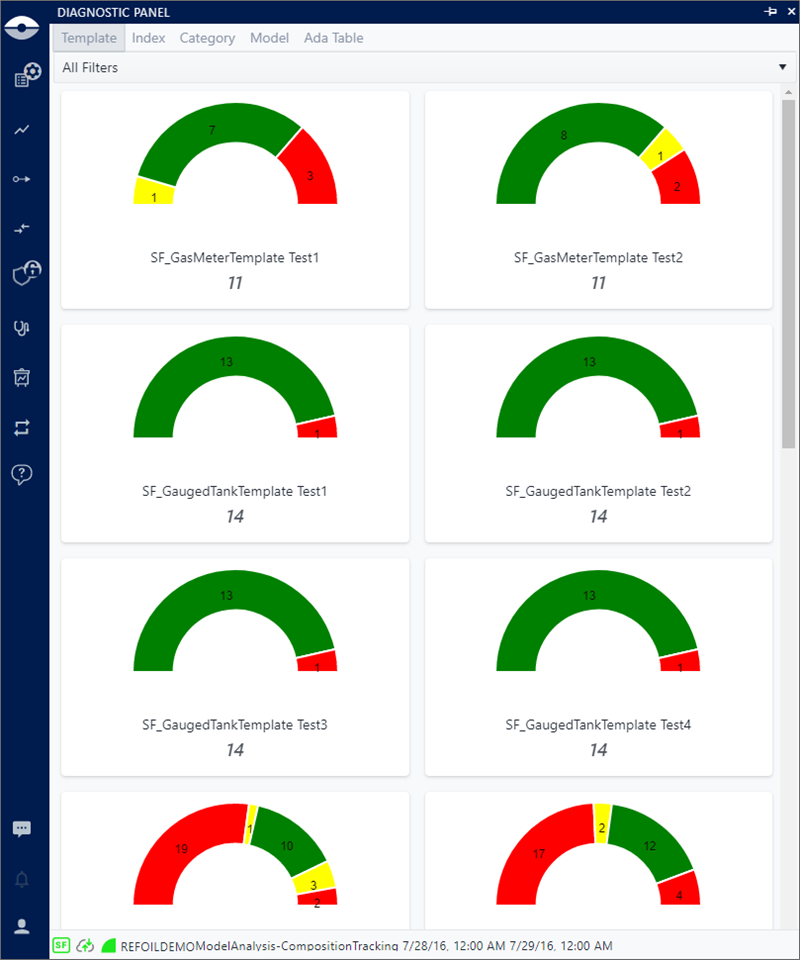
The information in the Diagnostic panel is represented using four groups. The first three groups present different aggregations of the statistical indexes and the last group shows model specific indexes.
Template: Provides the results based on each Template and its associated Statistical Indexes. The graph colors indicate the number of Elements that fall within or below the minimum and maximum range as set for the display. Colors are associated with the different index minimum and maximum thresholds, with the number of Elements that fall into each of those thresholds, as defined in the settings configuration.
Index: Provides the results aggregated by Statistical Indexes. The graph colors indicate the number of Elements that fall within or below the minimum and maximum range as set for the display. Colors are associated with the different index minimum and maximum thresholds, with the number of Elements that fall into each of those thresholds, as defined in the settings configuration.
Graph segments are automatically determined by SFHub Visualizer aggregating the different thresholds defined for the same statistical index on every Template; therefore, the resulting graph segments and their characteristics (color, min and max value) might be different from the ones defined on each Template.
Category: Provide the results of each statistical index aggregated by Category. Like the Template and Index groups, the colors are associated with the different index minimum and maximum thresholds, with the number of Elements that fall into each of those thresholds, as defined in the settings configuration.
Graph segments are automatically determined by SFHub Visualizer aggregating the different thresholds defined for the same statistical index on every Template associated to the Category; therefore, the resulting graph segments and their characteristics (color, min and max value) might be different from the ones defined on each Template.
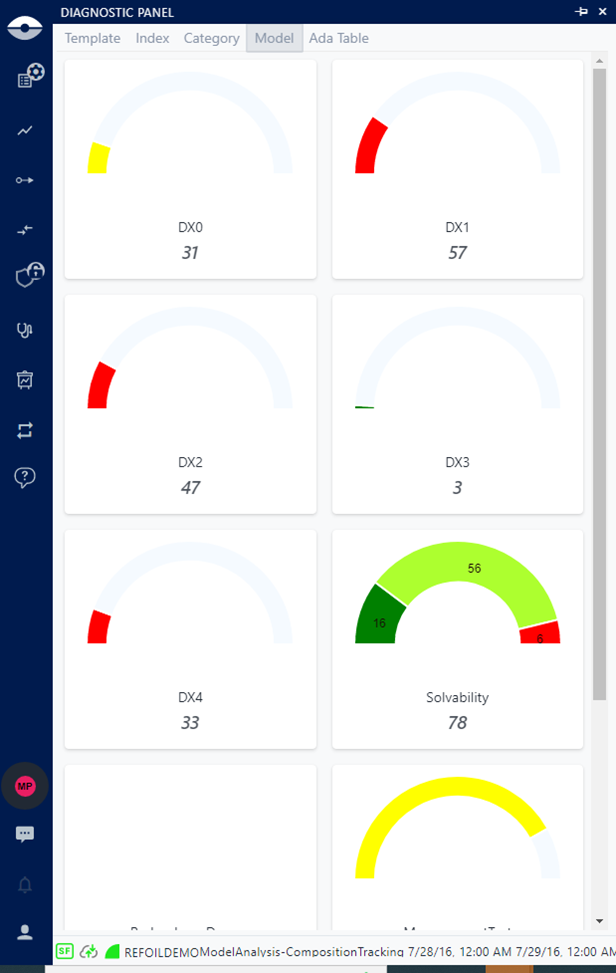
Model: Provides the results based on the Model Statistical Indexes, which help you gauge the overall quality of the reconciled results. This panel also provides the results for:
- Each model statistical indexes (Dx0..Dx4)
- Solvability - allows to analyze all the streams (flows and transfer) falling in not solvable conditions. If an Element range cannot be determined due to no data or an issue with the data, the information is included so that you can take proper actions; by default, these issue Elements are indicated by a gray color, unless you change the default in your Settings.
- Redundancy degree
- Balance test
- Measurement test
Element selection is supported only by the Solvability indicator; all other indicators are not associated to elements, as shown in the following figure.
Element selection supported only by Solvability
- ADA Table: This index provides a list of filters you can use to find specific types of elements, and then view the details for those elements in the Diagnostic Panel. The ADA Result table is visible in SFHub Visualizer only if ADA is licensed for the Sigmafine Server connected by the display. See Diagnostic - ADA Results Table for more information.
Each Diagnostic panel displays a colored graph split into segments, with each segment representing a minimum and maximum range of the Statistical Index, calculated by the analysis. Elements are associated with each segment according to the value of the Statistical Index. The graph, colors and minimum - maximum ranges are configurable under your user Settings. For more details see Attribute Settings under "User Settings".
You can drill-down into the Case's diagnostics to view all the Elements of the Case and to perform actions, such as adjustments.