Use Case Data Replication
The Case Replication feature allows you to copy Attribute data from the previous case (that is linked as per the Case Properties page) to the current case. The Attribute data that is to be copied depends on the configuration in the SFDiag_CaseRepl AF table. The data could be brought in as an 'Input' or an 'Adjustment' with an optional comment.
To use Case Data Replication:
With a case selected, click on the
 Case Replication icon in the command toolbar.
The Case Replication panel opens.
Case Replication panel
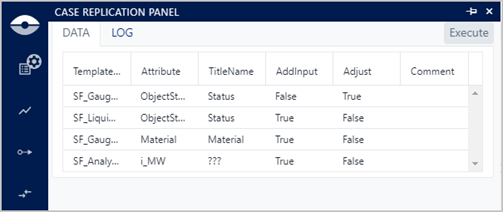
The panel contains an Execute button and two tabs; DATA and LOG.
- The Execute button initiates the Case Replication operation.
- The 'DATA' tab (as shown in above figure) displays the
configurations from the
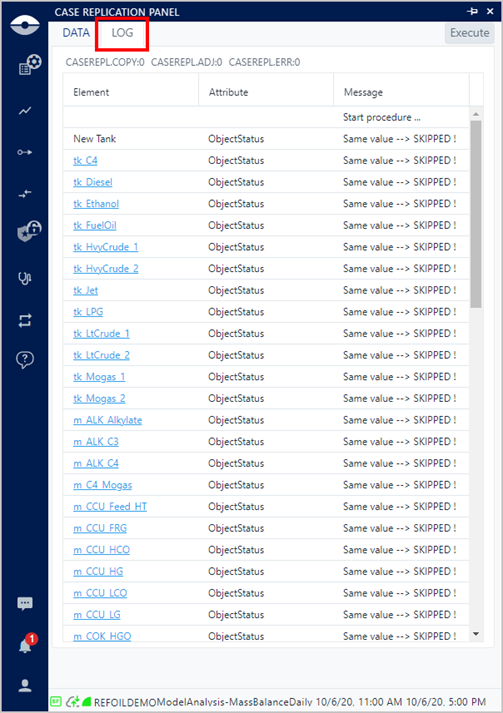
SFDiag_CaseReplAF table. Only those Elements and Attributes that are involved in the data replication operation are displayed. - The 'LOG' tab provides the detailed information on what is or has been executed during the most recent Case Replication operation (as shown in the following figure).
To run the Case Replication operation, click the Execute button.
Click the LOG tab to see the results of the case replication execution.
NoteThis feature is available only if ADA is licensed for the Sigmafine Server.
Case Replication - LOG tab