View Calculated Attributes
Attribute values of an element are often calculated as a result of "Data References" which themselves use other attribute values as input for the calculation. This dependency chain might sometimes be complex, when an intensive use of data references is done to obtain the inputs required by the Sigmafine analysis.
The calculated attribute details allow you to have a complete dependency chain of all the calculated attributes.
To view an Attribute's details:
Open the Element Detail Panel.
Click on the Calculated Attributes arrow to expand the list of the Element's calculated attributes.
Element Details - Calculated Attributes list
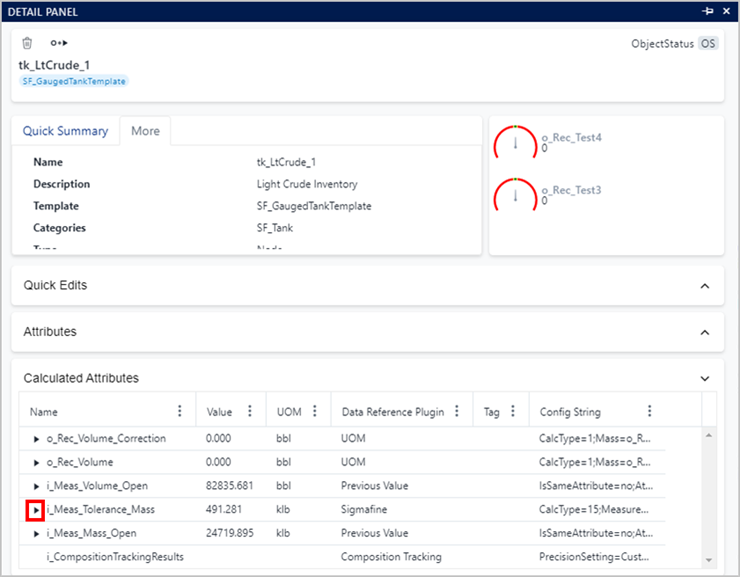
The attribute list is limited to only those attributes having a Data reference configured on.
The expand symbol (arrow) on the left of the attribute name, indicates that the attribute is depending on other attribute values according to the configured Data Reference.
Click on the expand symbol, to see the details of the used attributes.
List of a Calculated Attribute's inputs
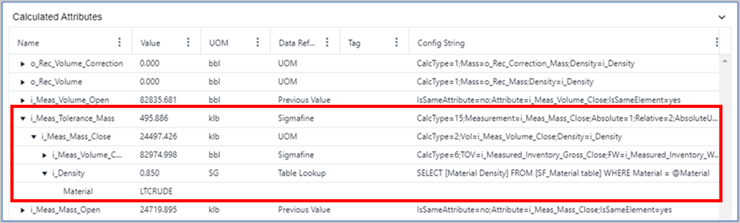
The following details are provided.
Calculated Attribute Details
Detail Description Name Displays the actual name of the attribute. Value Displays the value returned by the Data Reference. UOM Displays the Unit Of Measure of the attribute value Data Reference Plugin Displays the name of the configured Data Reference plugin. Tag Displays the PI Tag name (this field is filled only when the PIPoint Data Reference is used). Config String Displays the configuration string of the Data reference plugin.