Edit Complex Attributes
SFHub Visualizer provides the ability to edit complex attributes through the Element Details panel Attributes list.
To modify a complex attribute:
Open the Element Detail Panel.
Attributes List - Complex Attributes
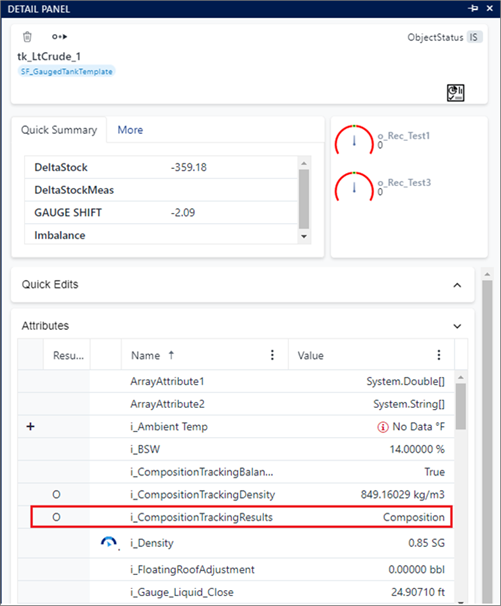
Click the attribute value of the complex attribute you want to edit.
In such instances, the attribute value reflects the name of a data table recorded in the attribute or the type of the recorded value, like System.String[] for string array, , System.Int32[] for integer array, and so on.
The Editor panel opens, allowing you to manipulate the contents.
Complex Attribute - Add a row
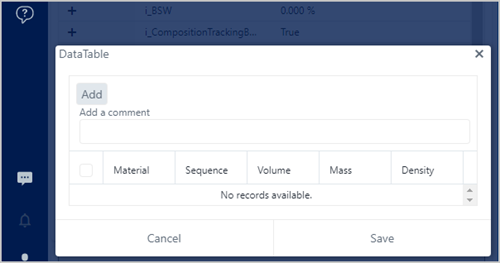
Follow the steps that coincide with what you want to accomplish.
To add a row
a. Click Add to add a new row.
Add a new row
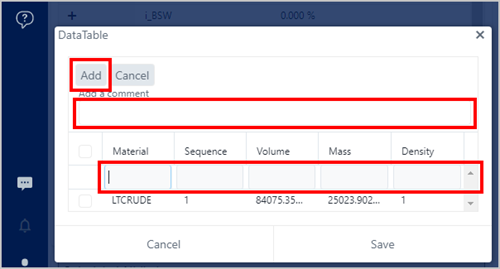
The Material box is automatically selected, where you can start entering the information.
b. In the Material box, type in the material you want to add.
c. In the remaining boxes, type in the remaining values for the material.
d. (Optional) In the Add a comment box, type a reason for the addition(s).
e. Click Save to save your addition(s).
f. (Optional) Repeat steps a - e, for each additional material you want to add.
To edit one or more values
a. In the Add a comment box, type a reason for the change.
b. Double-click in the box containing the value you want to change, and type the new value.
Complex Attribute - Edit a single value
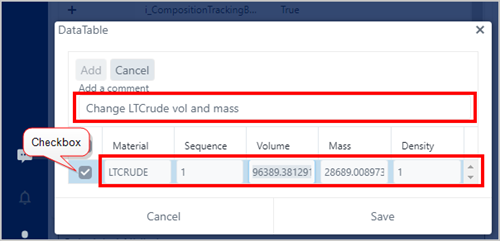
The checkbox becomes checked, indicating that you are editing a value in that row.
c. Repeat step b for each value you want to change, and for each row in which you want to change a value.
d. Click Save, to save your change(s). Click Cancel if you do not want to save your changes.
To remove a row
a. Check the checkbox next to the row you want to remove.
Remove a row
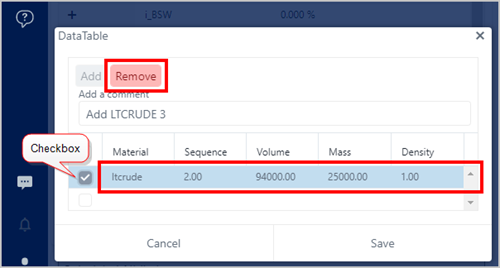
b. Click on Remove.
(Optional) To remove all changes you have entered or selected, click the panel's Close button in the upper-right corner.