Case Resource Management
From time to time, a case is dynamically connected to a display or report, to a user and then to a session, in SFHub Visualizer. The following figure shows how you can have the same display or report open in multiple sessions (tabs) in your browser.
User, Session and Display Relationship
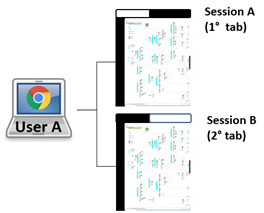
Where:
User: One to one with the browser (who logged into SFHub Visualizer).
Important Or CautionBecause you can log into SFHub Visualizer on the same computer using different user names, or on the same computer using different names, or on different computers using different browsers, SFHub Visualizer does not associate a user to a computer. Instead, it associates a user with the browser, and then with the computer.
Session: One browser tab hosting SFHub Visualizer. You may open multiple SFHub Visualizer instances duplicating browser tabs. (Right-click on the tab and select Duplicate.)
Display or Report: The display or report that has been selected in a specific browser tab. By opening multiple tabs, you can open different displays (or reports) or multiple instances of the same display or report.
Regarding Cases, SFHub Visualizer allows for the same Case to be viewed by the same user in multiple sessions or browsers, and by multiple users at the same time, while keeping the actions of one user separate from others accessing the same case.
The connections (case to display to user to session) allows for the same Case to be viewed by multiple users, while keeping the actions of one user separate from others accessing the same case.
In the following figure, we are looking at a specific case (Case A) that has been opened (loaded) by two different users, and in more than one Display. In these types of scenarios, SFHub Visualizer manages the displays by maintaining each with its own unique, sequentially assigned session.
Case Association example
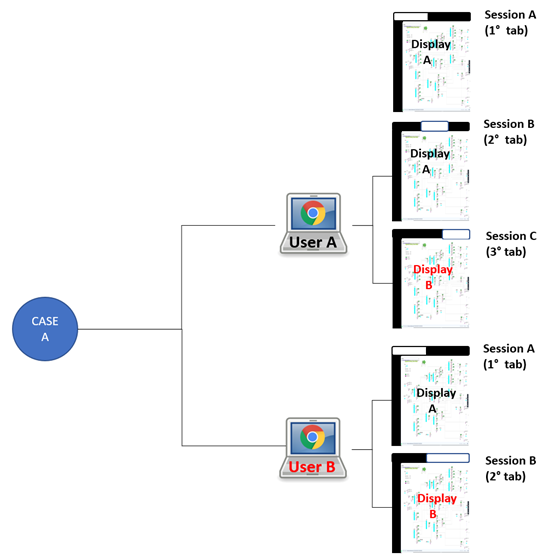
In the following table, we are looking at a specific case (Case A) that has been opened (loaded) by two different users, and in more than one Display. In these types of scenarios, SFHub Visualizer manages the displays by maintaining each with its own unique, sequentially assigned session. Any additional Cases opened by the same two users would be assigned as shown in the last two rows.
Case Resource Management Example
| Case | opened in Display | by User | assigned Session |
|---|---|---|---|
| Case A | Display A | User A | A |
| Case A | Display A | User A | B |
| Case A | Display A | User A | C |
| Case A | Display B | User B | D |
| Case A | Display A | User B | E |
| Case ? | Display ? | User A | F |
| Case ? | Display ? | User B | G |