Templates Panel
The Template panel is intended for listing all Sigmafine Templates pertaining to Sigmafine database and for adding graphic Symbols to displays from a template selection. The panel will not be available while working with Whiteboard display (i.e. display not connected to a Sigmafine Server).
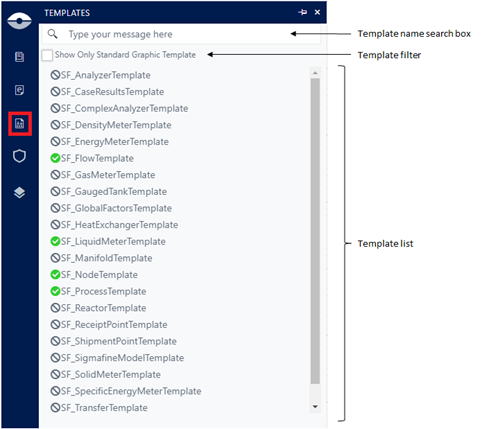
Inside of it, you can search by template name, see only the elements that have associated Standard Graphic Templates. Green checkbox indicates that a standard graphic template is available. If green checkbox is not shown, that means that a standard graphic template has not been yet associated to the Sigmafine Element template.
Listed templates can be added to the display via Drag & Drop gesture if a Standard Graphic Template is defined; the Graphic Symbol is created in the display and the user shall have to associate the Sigmafine Element (see Add Element to display).