Display Status Bar
The display status bar appears on the bottom of all displays.

Quick zoom
The quick zoom feature allows you to quickly adjust the zoom level of the display at a convenient level. Click on the percentage value to entry the desired zoom level.

Save to Draft
Save all the changes made on the display on the temporary/working copy of the display. This option allows to keep the authoring session open and continue working on the display.
This is equivalent ot the 'Save and Close' option available on the Close button but without closing the display authoring session.
Model changes are saved on the AF database and the Model keeps checked out by the user. No other users can change the Model on another authoring session until the original user publishes or discards the temporary copy of that display.
Close
Allows to close the authoring session by discarding the changes, or saving the changes into the working copy, or publishing the display.
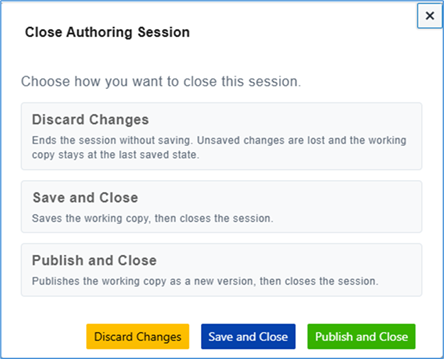
See Close Display for more details.
Publishing a display view saves changes on a temporary copy, which must be published then in the main display.