Display Management
Authoring Display is any activity that involves creating or editing a display as well as creating, versioning and modifying the Sigmafine Model.
The display authoring function includes the following features:
See following topic for more details about:
Automatic Model and Display Reservation
Considering that all SFHub resources are shared both by SFHub services and by users who are connected, the Authoring of a display can be performed by only one session (a user and a specific browser tab) at a time.
Furthermore, since displays are synchronized with the AF Database at any moment only one session is enabled in authoring on a specific Model to avoid that several users work simultaneously on the same Model.
Model is also automatically reserved when creating a new display bound to its Model. Obviously, this does not apply to displays not connected to a database (i.e. Whiteboard).
Display Versioning
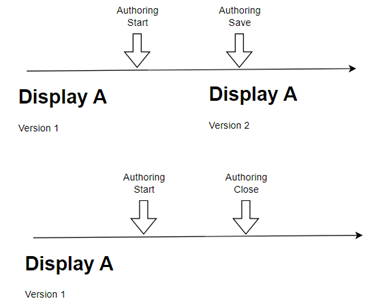
SFHub Authoring keeps a copy of previous versions of saved displays. In other words, saving changes to an existing display creates a new version of it and allows to retrieve a previous version to be reinstated as shown on the figured below.
Working Copy
While a display is in authoring mode, all changes are applied to the working copy of the document, this will preserve the current version that will continue to be available to other users for working with it. Creating a new display or authoring an existing one will result in the creation of a working copy.
A temporary document is created to temporarily store information to act as a safety net to prevent data loss. SFHub determines automatically when it needs to create temporary document, only a temporary document is maintained per each display and user.
Keep in mind that at the same time there may be one temporary document for the same display, one per user.
Temporary documents are deleted when the authoring session is intentionally terminated, if the authoring session is suddenly closed (network issue, invalid close of the browser, etc..) the temporary document is maintained.
The temporary files are kept until the first of:
- The same user opens the temporary file.
- The same user opens in authoring the same display.
Each user will have access to his own temporary file through the display selection panel; the panel is extended to provide access to all temporary files, i.e., all authoring activities not completed.
Autosave
While in authoring mode on a display, all changes are automatically saved in the working copy of the document every five minutes.