Close Display
When you finish authoring a display, you can close the display by clicking on the Close button on the right of the display status bar.
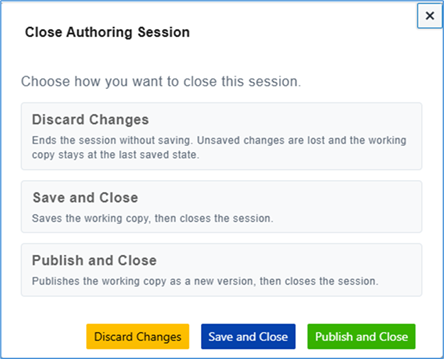
The close button shows three options:
Discard Changes:
All changes made to the display are discarded as well as the Model changes (i.e. an undo check-out of the Model is performed).
NoteThe working copy of the display is not removed when you select this option. If you open again the same display, the working copy will be available with all the changes you made before the last Save and Close of the display.
Save and Close:
All changes made to the display are saved into the working copy of the display and the model stay checked-out (model changes keep stored in the sandbox).
NoteNo other users can change the Model on another authoring session until the original user publishes or discards the temporary copy of that display.
Publish and Close:
All changes made to the display are saved as well as the Model changes (i.e. a Model check-in is performed). A new version of the display is created and the working copy of the display is removed.