Write
The following table provides information regarding the 'Write' SFCodeBlock.
Write SFCodeBlock
| Category | SF Attributes |
|---|---|
| Description | The Write Attribute code block allows you to change an attribute value using the value returned by the specified expression, as well as to |
| Input | AF Element |
| Parameters | None |
| Pattern Support | Yes |
| Returns | None |
| Configuration | You are required to configure at least a Write Attribute. Since the 'Write Attribute' supports multiple patterns, you can add as many Write Attributes as are required. Add a Write Attribute To add and configure a Write Attribute: 1. Click on the Add button. Add Write SFCodeBlock  2. Enter your configuration values in the Add Write configuration panel. 3. Click Save. 4. Repeat steps 1 - 3 for each Write Attribute you need to add. Edit a Write Attribute To edit the parameters for a Write Attribute: 1. Click on the Write Attribute placeholder you need to edit. Edit Write SFCodeBlock  2. Enter your changes in the Edit Write configuration panel. 3. Click Save. |
Write Configuration Panel
The Write configuration panel allows you to configure different actions. Remember one action only can be configured per each Write Attribute code block.
Attribute tab
Use this tab to change the default value in the Sigmafine database for the selected attribute.
| Item | Required / Optional | Description |
|---|---|---|
| Attribute | Required | Name of the attribute in which to change the default value. |
| Attribute Value | Required | Expression result in which the value is used to write the value in the attribute. |
| Unit of Measure | Optional | Unit of measure for the value returned by the expression. If not specified, it is assumed that the value is based on the default Unit of Measure for the attribute. |
Adjustment tab
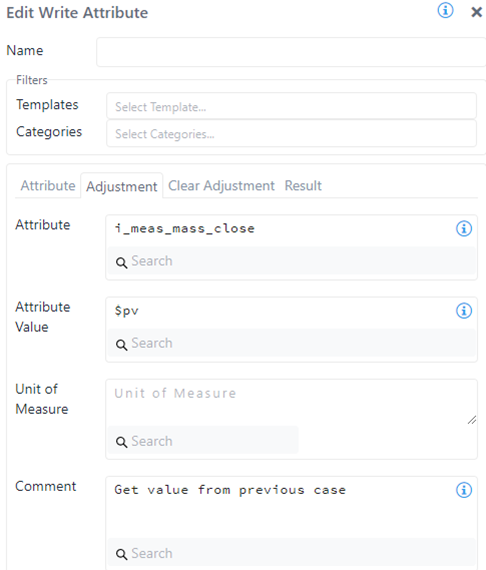
Use this tab to create an adjustment in the selected attribute.
| Item | Required / Optional | Description |
|---|---|---|
| Attribute | Required | Name of the attribute in which to create the adjustment. |
| Attribute Value | Required | Expression result in which the value is used to create the adjustment. |
| Unit of Measure | Optional | Unit of measure for the value returned by the expression. If not specified, it is assumed that the value is based on the default Unit of Measure for the attribute. |
| Comment | Optional | Free text for the adjustment's comment. |
Clear Adjustment tab
Use this tab to clear the adjustment in the selected attribute.
| Item | Required / Optional | Description |
|---|---|---|
| Attribute | Required | Name of the attribute in which to clear the adjustment. |
| Comment | Optional | Free text for the clear adjustment comment. |
Result tab
Use this tab to reset the result stored in the attribute.
| Item | Required / Optional | Description |
|---|---|---|
| Attribute | Required | Name of the attribute in which to reset the result or the adjustment. |
| Remove Input | Optional | If selected, reset the input result recorded in the selected attribute. |
| Remove Output | Optional | If selected, reset the output result recorded in the selected attribute. |
| Remove Adjustment | Optional | If selected, clear the adjustment in the selected attribute. |
| Comment | Optional | Free text for the clear result comment. |
You can select any combination of the above options to perform the required reset action. For example, the Remove Adjustment option is equivalent to the Clear Adjustent but, using this option in this context, allows you to reset the result as well in the selected attribute.
Example: Write Attribute
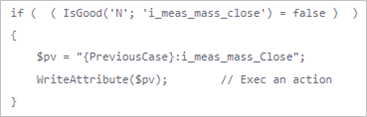
In this example, the analytic checks if there is a bad value on the i_meas_mass_close attribute and then it creates an adjustment using the value from the previous case.
| Write Attribute - SFCodeBlock | Configuration Panel |
|---|---|
 |  |
Below is an example of the code from the above configuration.
Write Attribute - SFCodeBlock Code