If Then
The following table provides information regarding the 'If Then' SFCodeBlock.
If Then SFCodeBlock
| Category | Logic |
|---|---|
| Description | Executes the inner stacked SFCodeBlocks, if the condition is true. The If Then statement requires you to define an expression, or multiple expressions, taking advantage of multi-patterns support that evaluates to true of false. Please refer to the SFHub Expression manual for more details on how to define an expression. |
| Input | AF Element |
| Parameters | None |
| Pattern | Support Yes |
| Returns | None |
| Configuration | You are required to enter at least one condition. Add a Condition To add a condition: 1. Click the Add button. If Then SFCodeBlock - Add  2. Enter the expression in the configuration panel. 3. Click Save. Edit a Condition To edit a condition: 1. Click on the condition placeholder, to open it in the configuration panel. If Then SFCodeBlock - Edit condition expression 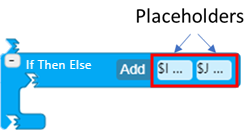 2. Modify the expression as needed. 3. Click Save. |
Note
Multiple patterns are treated as an OR condition.
If Then Configuration Panel
The If Then configuration panel allows you to configure an expression for a condition relative to the If Then statement.
The following table describes the configuration options.
If Then Configuration
| Item | Required/Optional | Description |
|---|---|---|
| Expression | Required | The expression containing the condition to be evaluated. Please refers to the Expression section for more details on how to define an expression. |
Example 1: Simple Expressions
| Expression | Description |
|---|---|
| $var = 0 | $var = 0 Evaluate if the variable is equal to zero |
| "ObjectStatus" = 'OS' | Evaluate if the element has the ObjectStatus attribute equal to 'OS' |
| "MassTolerance" = 0 | Evaluate if the element has the MassTolerance attribute equal to zero. |
| Abs(ReconciledMassTest1) > 1000 | Evaluate if the element has the absolute value of the ReconciledMassTest1 greater than 1000. |
Example 2: Using Patterns
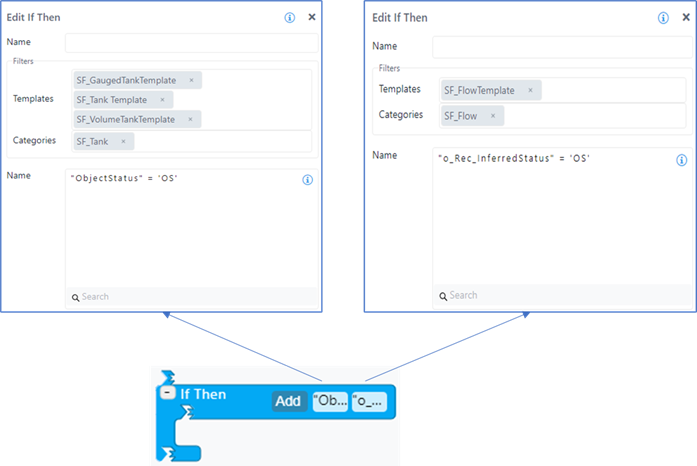
In this example, two patterns have been configured to:
Evaluate if the ObjectStatus of tanks is equal to 'OS'.
Evaluate if the Inferred Status of flows is equal to 'OS'.
Example using patterns