Wait Analytic
The following table provides information regarding the 'Wait Analytic' SFCodeBlock.
Wait Analytic SFCodeBlock
| Category | Analytics |
|---|---|
| Description | Wait for the completion of spawned analytics, the following options are supported: All Wait until all spawned analytics complete. Async Token Wait until the spawned analytic, impersonated by the Async Token, is completed. By Name Wait for the completion of the selected analytic. |
| Input | None |
| Parameters | None |
| Pattern Support | None |
| Returns | None |
| Configuration | You are required to configure the SFCodeBlock. To configure the SFCodeBlock: 1. Click on the empty label. Wait Analytic SFCodeBlock  2. Enter your configuration values in the Wait Analytic configuration panel. 3. Click Save. |
Wait Analytic Configuration Panel
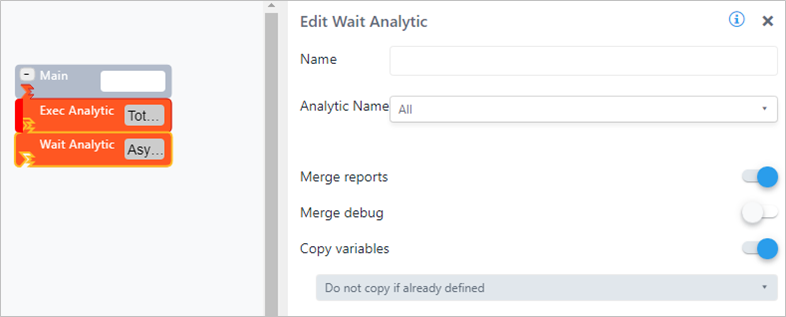
The Wait Analytic configuration panel allows you to choose an analytic and configure how you want to wait for its completion.
The following table describes the configuration options.
Wait Analytic Configuration
| Item | Visibility | Description |
|---|---|---|
| Analytic name | X | A drop-down list of all the analytics defined in the current Studio project, choose the one of |
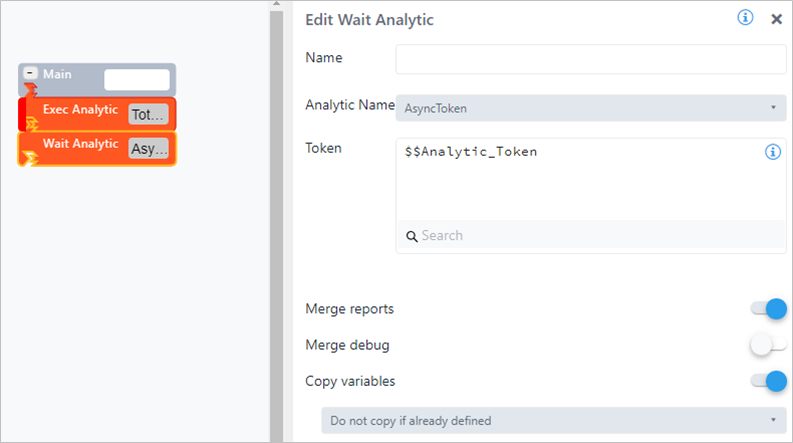
| Token | Visible only if AsyncToken is selected | The analytic variable containing the async token. |
| Merge reports | X | Enable or disable the merging of the executed analytic report's records with the current report's records collection. If enabled, at analytic completion, all reports' records are automatically added to the current analytic collection. |
| Merge debug | X | Enable or disable the merging of the executed analytic debug records with the current debug records collection. If enabled, at analytic completion, all debug records are automatically added to the current analytic collection. |
| Copy variables | X | Enable or disable the merging of the executed analytics' variables, with the current analytic's variables collection. If enabled, at analytic completion, all analytic variables are automatically merged. |
| Copy variables option | Visible only if Copy variables is enabled | The following options are supported: Merge variables content 1. If the analytic variable is not defined, then it is added. 2. If the analytic variable is defined, its content is merged. Replace variables content 1. If the analytic variable is not defined, then it is added. 2. If the analytic variable is defined, its content is replaced. Do not copy if already defined 1. If the analytic is already defined in the current analytic, it is not copied. |
Example: 1 In this example, the analytic executes an analytic and then waits for the completion of the spawned analytic, using the synchronization token (an Analytic variable), and finally imports analytic reports and variables.
The synchronization token is returned in the $$Sync_Token variable.
Example: 2
In this example, the analytic exec an analytic and then waits for the completion of all the spawned analytics, in our case only one, and finally imports analytics reports and variables.