For Each
The following table provides information regarding the 'For Each' SFCodeBlock.
| Category | Logic |
|---|---|
| Description | The 'ForEach' loop executes the inner stacked SFCodeBlocks for a collection of items. The number of iterations is based on the number of items stored in thecollection. Working Space Depending on the collection, the working space may be affected by the codeblock. Case While iterating cases, the context is switched over cases and the working space is updated in the following way: - All analytic variables are preserved. - Element variables that refer to element existing in both the current and the new case, are preserved. - Elements existing in the new case only, are loaded in the working space. - Elements existing in the current case only, are discarded. - Transfers of the current case are not preserved, this includes all related variables. - Transfers of the new case are loaded in the working space. Children element While iterating children elements, the element context is switched from parent to child at the end of the for each codeblock. The original element context is restored. Previous element While iterating the previous element, the element context is switched from current to parent at the end of the for each codeblock. The original element context is restored. Number of iterations Depending on the collection, the number of iterations may be different from element to element. Attributes While iterating for an attribute value, each element is iterated based on the content of the specified attribute. Variables While iterating for ananalytic variables value, the number of iterations is equal for all the elements (the variable is global). While iterating for an element variable value, the number of iterations varies from element to element, based on the content of the variable Note The 'foreach' cycle is executed in parallel, for each element of the workingspace. |
| Input | Current Working Space |
| Parameters | None |
| Pattern Support | Limited |
| Returns | Updated Working Space (depending on the collection type) |
| Configuration | You are required to configure the loop. To configure the loop: 1. Click on the empty label. For Each SFCodeBlock  2. Choose the type of collection to be enumerated. 3. Enter the parameter configuration in the configuration panel, based on the type you have chosen. |
For Each Configuration Panel
The following table describes the configuration options.
For Each Configuration
| Item | Required | Description |
|---|---|---|
| Type | X | The Type drop-down allows you to select the type of collection to be enumerated. The following types of collections are supported: 1. Children Elements - Enumerate the children elements of the current element. 2. Previous Element - Enumerate the parent element of the current element 3. AF Table - Enumerate the rows of an AF Table 4. Attributes - Enumerate the items of a complex attribute type (Data Table or Array) contained in an attribute of the current element 5. SFHub Tables - Enumerate the rows of a SFHub table 6. Cases - Enumerate the Sigmafine Cases 7. Transfers - Enumerate the transfers stored in the Sigmafine database 8. Variable - Enumerate items stored in variables of complex data types (List, Table, Row or Dictionary). The configuration panel will dynamically show the required parameters for the selected type of collection to be enumerated. |
For Each - Children Elements
The Children Elements option allows you to enumerate all child elements of the current element in your Working Space.
While executing the inner SFCodeBlocks, the context is automatically switched to the child element of the current element.
Inside the for each loop, the enumerated Element owns properties named {Name}, {PreviousElement}, {TopElement} (holding the current enumerated element, the parent element, and the root element), as well as all variables owned by the parent Element. See the Context Switch Keywords in "Switch Keywords" section of the "SigmafineHub Expressions Guide", for more information.
The For Each - Children Elements configuration does not require any parameters.
For Each - Previous Element
The For Each - Previous Element allows you to enumerate the parent elements of the current element.
Important: Previous Element CAN ONLY BE USED while navigating connections, allowing you to navigate back within the connection chain.
The For Each - Previous Element configuration does not require any parameters.
For each - AF Table and SFHub Table
The For Each - AF Table and SFHub Table option allows you to enumerate and access rows stored in an AF Table or in a SFHub Table.
The 'For Each' loop over an AF Table or SFHub Table does not make any kind of switch on the current Working Space.
For Each - AF Table and SFHub Table Configuration Panel
The following table describes the configuration options.
For Each - AF Table and SFHub Table Configuration
| Item | Required / Optional | Description |
|---|---|---|
| Enumerator Name | Required | Name assigned to the table rows enumerator. See the SFHub Enumerator topic "SFHub Enumerator" section of the "SigmafineHub Expressions Guide", for more information. The Enumerator Name represents the row entity containing the column values. It can be used inside the loop to access the content of each column. The row column can be addressed by the column name or by the column index. The first column has index = 0 (See the SFHub Table topic "SFHub Table" section of the "SigmafineHub Expressions Guide", for more information). |
| Row in Table | Required | The Row in Table drop-down list allows you to qualify the name of the AF Table to access. The listed AF Tables are related to the Sigmafine database to which the SFHub project is linked. |
| Where | Optional | An expression that allows you to filter table rows. (See the SFHub Table Row Filter Syntax section of the "SigmafineHub Expressions Guide", for more information). |
| Order By | Optional | Order By allows you to order the table content based on a column name. If the column name contains a space or reserved characters, enclose the column name within square brackets [].ColumnA -- square brackets not required[Column A] -- square brackets are requiredUse a comma separated column list to specify multiple columns. ColumnA , ColumnB |
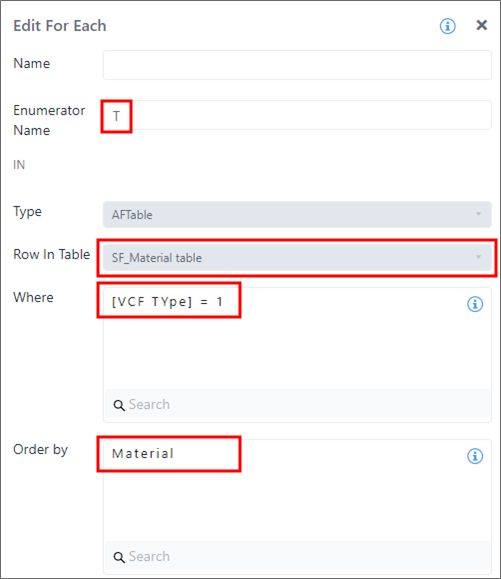
Example: 1
In this example, the enumerator 'T' is used to enumerate the rows of the 'SF_Material table' having the 'VCF Type' column value equal to '1' and ordered by the Material column.
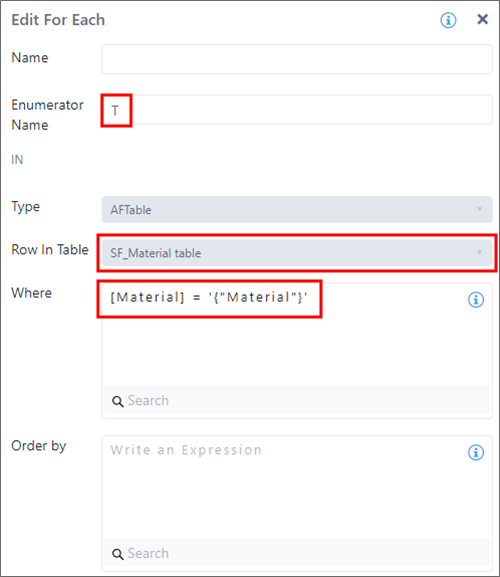
Example: 2
In this example, the enumerator 'T' is used to enumerate the rows of the 'SF_Material table' having the 'Material' column match the value of the Material attribute of the current element.
For Each - Attributes
The For Each - Attributes option allows you to enumerate the items of a complex attribute type (Table or Array) contained in an attribute of the current element.
For Each - Attributes
The following table describes the configuration options.
| Item | Required / Optional | Description |
|---|---|---|
| Enumerator Name | X | Name assigned to the table rows enumerator. See the SFHub Enumerator topic "SFHub Enumerator" section of the "SigmafineHub Expressions Guide", for more information. The Enumerator Name represents the row entity containing the column values. If of type Table, or array items, or if of type Array, and can be used inside the loop to access the content. The row column or the array position can be addressed by the column name or by the column index. The first column has index = 0. |
| Value Attribute | X | The Value Attribute drop-down list allows you to select the name of all the attributes. The drop-down list shows only those attributes containing complex data (Data Table or array). |
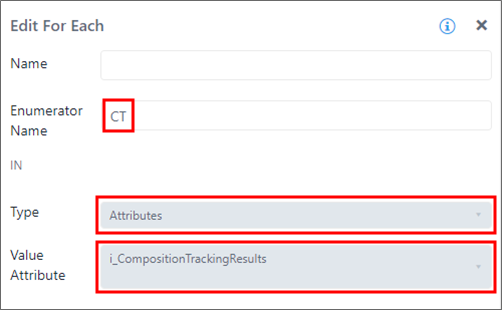
Example: Enumerator used to enumerate rows of composition tracking table
In this example, the enumerator 'CT' is used to enumerate the rows of the composition tracking table stored in the attribute 'i_CompositionTrackingResults'.
For Each - Case
The 'For Each' loop over Sigmafine Cases allows you to switch the execution context from your current case to the context of any of the enumerated cases, thus allowing you to access each element data in multiple cases. The element context is preserved although the Element refers to the cases in the loop. Notice that the same element may not exist in all the cases.
For Each - Case Configuration Panel
The following table describes the configuration options.
Case Configuration
| Item | Visibility | Description |
|---|---|---|
| Analyses | X | The Analyses drop-down list allows you to select the Sigmafine analysis for which to enumerate the cases. The listed analyses are related to the Sigmafine database and model to which the SFHub project is linked. |
| Period | X | This is a drop-down list box allowing to specify the periods that enumerate the cases. The following types of periods are supported: Free time range - Between - All cases included in the specified time range, according to the Start and End parameters. Current execution time of the analytic - Current Month - All cases included in the current month. - Last Month - All cases included in the last month. - Current Quarter - All cases included in the current quarter. - Previous Quarter - All cases include in the previous quarter. Date of the current selected Case - Current Month (selected case) - All cases included in the current month. - Last Month (selected case) - All cases included in the last month. - Current Quarter (selected case) - All cases included in the current quarter. - Previous Quarter (selected case) - All cases include in the previous quarter. - Current Year - All cases included in the current year. - Previous Year - All cases include in the previous year. |
| Start | Visible if Period is Between | The date of the period began, when the 'Between' option is selected. |
| End | Visible if Period is Between | The date the period ended, when the 'Between' option is selected. |
| Order By | X | The Order By drop-down list allows you to specify the sort order of the returned case list. (This item is optional.) The Order By is applied to the Case start time. Supported options are: - Older to Newer - Newer to Older |
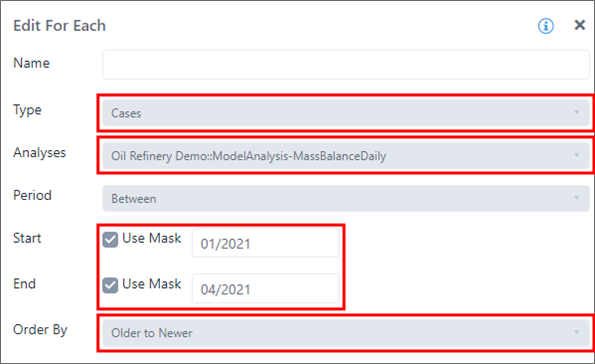
Example: 'For Each' loop used to enumerate Sigmafine Cases
In this example, the 'For Each' loop is configured to enumerate all the Sigmafine Cases of the model analysis 'ModelAnalysis-MassBalanceDaily' included in the period starting from 'Jan 2021' until 'April 2021'. The case list is returned sorted by older to newer.
For Each - Transfers
The For Each - Transfers option allows you to enumerate transfers stored in the Database. The 'For Each' loop over Transfers does not make any kind of switch on the current Working Space.
For Each - Transfers Configuration Panel
The following table describes the configuration options.
| Item | Description |
|---|---|
| Enumerator Name | Name assigned to the transfer's enumerator. See the [SFHub Enumerator] topic "SFHub Enumerator" section of the "SigmafineHub Expressions Guide", for more information. The Enumerator Name represents the enumerated transfer in the collection. It can be used inside the loop to access the transfer properties and attributes. |
| Source | Allows you to use filter a transfer by a specific source element. |
| Destination | Allows you to filter a transfer by a specific destination element. |
| Use Case Time Range | Searches the transfers in the Case time range. |
| Start Date Time | Searches the transfers starting at or after the specified date. |
| End Date Time | Searches the transfers ending at or before the specified date. |
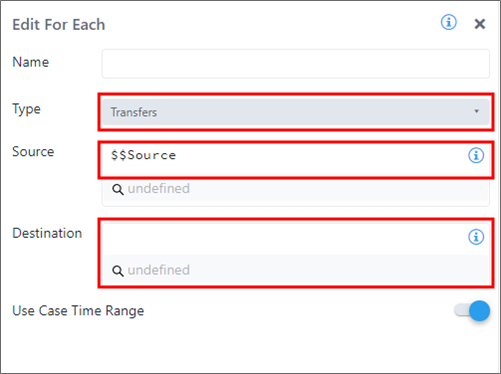
Example 1: 'For Each' used to enumerate Transfers
In this example, the 'For Each' loop is configured to enumerate all the transfers matching the following criteria:
- Source element equal to the content of the variable $$Source
- Any destination
- Start time overlapping the case start time
- End time overlapping the case end time
For Each - Transfer Example
Example 2: 'For Each' used to enumerate Transfers
In this example, the 'For Each' loop is configured to enumerate all the transfers matching the following criteria:
- Any source
- Any destination
- Start time overlapping the case start time
- End time overlapping the case end time
For Each - Variable
The For Each - Variable option allows you to enumerate items stored in variables of complex data types (List, Table, Table Row and Dictionary).
The 'For Each' loop over a Variable does not make any kind of switch on the current Working Space.
For Each - Variable Configuration Panel
The following table describes the configuration options.
| Item | Required / Optional | Description |
|---|---|---|
| Enumerator Name | Required | Name assigned to the item's enumerator. See the [SFHubEnumerator] topic "SFHub Enumerator" section of the "Sigmafine Hub Expressions Guide", for more information. The Enumerator Name represents the enumerated item in the collection. It can be used inside the loop to access its content. - If the variable is a Table, it can be used to access the content of each column of the enumerated table rows. The row column can be addressed by the column name or by the column index. The first column has index = 0. (See the SFHub Table section of the "SigmafineHub Expressions Guide", for more information). - If the variable is a List, it can be used to access the recorded value. - If the variable is a Dictionary, it can be used to access the recorded pair (key, Value). |
| Variable | Required | The variable to be enumerated. |
Example: 'For Each' used to enumerate items collected in a Variable
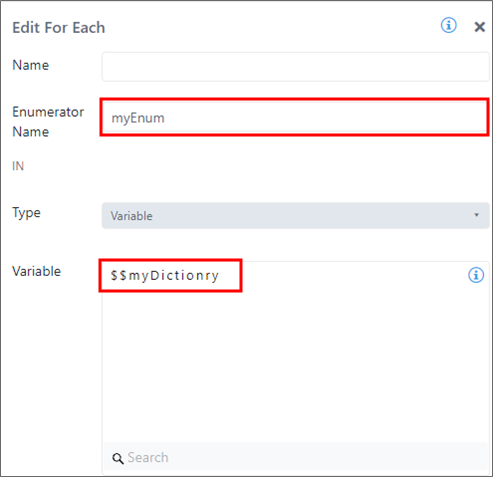
The enumerator 'myEnum' is used to enumerate the items collected in '$$myDictionary' variable.