If Then Else
The following table provides information regarding the 'If Then Else' SFCodeBlock.
If Then Else SFCodeBlock
| Category | Logic |
|---|---|
| Description | Executes the stacked SFCodeBlocks connected to the port. Considered True if the condition is true or the stacked SFCodeBlocks are connected to the port. Considered False if the condition is false. The If Then statement requires you to define an expression, or multiple expressions, taking advantage of multi-patterns support that evaluates to true of false. Please refer to the SFHub Expression manual for more details on how to define an expression. |
| Input | AF Element |
| Parameters | None |
| Pattern Support | Yes |
| Returns | None |
| Configuration | You are required to enter at least one condition. Add a Condition To add a condition: 1. Click the Add button. If Then Else SFCodeBlock - Add  2. Enter the expression in the configuration panel. 3. Click Save. Edit a Condition To edit a condition: 1. Click on the condition placeholder, to open it in the configuration panel. If Then SFCodeBlock - Edit condition expression 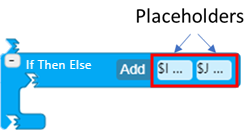 2. Modify the expression as needed. 3. Click Save. |
If Then Else Configuration Panel
The If Then Else configuration panel allows you to configure an expression for a condition relative to the If Then Else statement.
The following table describes the configuration options.
If Then Else Configuration
| Item | Required/Optional | Description |
|---|---|---|
| Expression | Required | The expression containing the condition to be evaluated. Please refers to the Expression section for more details on how to define an expression. |