Task Run
The following table provides information regarding the 'Task Run' SFCodeBlock.
Task Run SFCodeBlock
| Category | Task |
|---|---|
| Description | Task Run allows you to create a task for executing a function in parallel. In principle Task Run works like the 'Call' SFCodeBlock, however, using task run, the function is executed in parallel to the analytic thereby accelerating its processing. It is therefore necessary to wait for the completion of the task using the Task Await code block, which blocks the execution of the analytic until the completion of the task. The selected function has access to the current working space and all analytic variables, as well as all current element variables. Notice that new element variables allocated in the function executed in the new Task, will not be accessible after the task completes. |
| Input | None |
| Parameters | None |
| Pattern Support | None |
| Returns | None |
| Configuration | You are required to configure the function to be executed and the variable to contain the task token for further synchronization. |
Task Run Configuration Panel
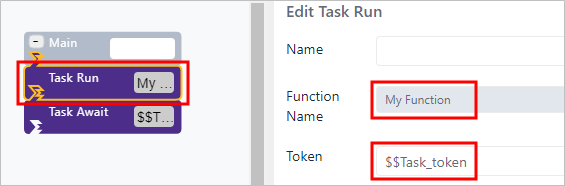
The Task Run configuration panel allows you enter the function to be executed and the variable that is to contain the task token.
The following table describes the configuration options.
Task Run Configuration
| Item | Description |
|---|---|
| Function Name | The name of the function to be executed. |
| Token | The Analytic variable that is to contain the task token. The variable receives the task synchronization token and should be used in the appropriate Task Await code block, to synchronously wait for the execution to complete. |
Example: Task Run
In this example, the analytic runs a task and then waits for its completion.
Task Run example

The Task Run specifies the name of the function and the Analytic variable to be assigned with the synchronization token, as shown in the Edit Task Run configuration panel in the following image.
Task Run Configuration panel