Task Await
The following table provides information regarding the 'Task Await' SFCodeBlock.
Task Await SFCodeBlock
| Category | Task |
|---|---|
| Description | Waits for the task to complete execution. |
| Input | None |
| Parameters | None |
| Pattern Support | None |
| Returns | None |
| Configuration | You are required to configure the Analytic variable containing the Task token. Add a Task Await Variable To add a Task Await code block: 1. Click on the empty label to open the configuration panel. Task Await - open Edit Task Await panel  2. Enter your configuration values in the Add Task Await configuration panel. 3. Click Save. Edit a Task Await Variable To Edit a Task Await code block: 1. Click on the Task Await label name. Task Await Label Name and Token variable 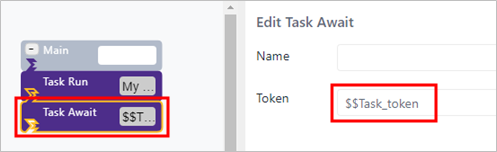 2. Enter your changes in the Edit Task Await configuration panel (as shown on the right side of the image in Figure 3). 3. Click Save. |
Task Await Configuration Panel
The Task Await configuration panel allows you to wait until a task execution completes, before moving on to the next task or code block.
The following table describes the configuration options.
| Item | Description |
|---|---|
| Token | The Analytic variable containing the task token. The variable name has been specified in the Task Run SFCodeBlock. |
Example: Task Await
In this example, the analytic runs a task and then waits for its completion.
Task Await example

The Task Await code block specifies the name of the Analytic variable containing the token assigned by the Task Run code block, as shown in the Edit Task Await configuration panel in the following image.
Task Await Configuration panel - Token