Interface
The following table provides information regarding the 'Interface' SFCodeBlock.
Interface SFCodeBlock
Interface Configuration Panel
The Interface configuration panel allows you to configure an analytic variables of type 'Interface'.
The following table describes the configuration options.
Interface Configuration
| Category | Logic |
|---|---|
| Description | Allows for the definition of analytic variables of type 'Interface'. Analytic variables defined in the Interface SFCodeBlock differ from standard analytic variables as they are exposed (made public) inside SFHub acting as dynamic parameters. Declare analytic variables using the Interface code block, if you want treat them as parameters. SFHub web applications automatically recognize analytic parameters. |
| Input | None |
| Parameters | None |
| Pattern Support | None |
| Returns | None |
| Configuration | You are required to configure the interface. Add an Interface To add an interface: 1. Click the Add button. Interface SFCodeBlock - Add  2. Enter the expression in the configuration panel. 3. Click Save. Edit an Interface Expression To edit an interface expression: 1. Click on the expression placeholder, to open it in the configuration panel. Interface SFCodeBlock - Edit  2. Modify the expression as needed. 3. Click Save. |
Interface Configuration Panel
The Interface configuration panel allows you to configure an analytic variables of type 'Interface'. The following table describes the configuration options. Interface Configuration
| Item | Required / Optional | Description |
|---|---|---|
| Variable Name | Required | The name of the interface variable. The name must start with the double dollar characters ($$). |
| Description | Optional | A short description of the interface. |
| Value | Required | Indicates the default value assigned to the variable. The value is any expression whose result is used to qualify the parameter. |
| Type | Required | Type of interface used to qualify its purpose. Free Used to qualify a general-purpose interface. Attributes Used to qualify an interface that provides a list of attribute names to be processed by the analytic. Template Used to qualify an interface that provides an element template name to be processed by the analytic. Uom Used to qualify an interface that provides a unit of measure to be used by the analytic. UOM Class Used to qualify an interface that provides a class of unit of measure to be used by the analytic. |
| Separator | Required | The character used as a separator in the list of values. |
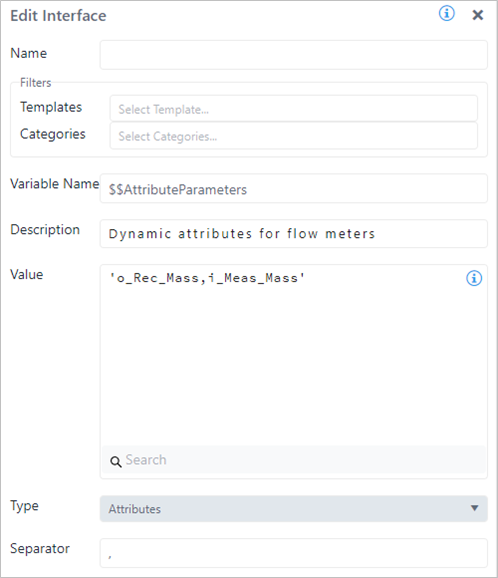
Example: Edit Interface - configuration
In this example, the Interface variable is named $$AttributesParameters and its default value is initialized by a string containing a list of attribute names, comma separated. The Type parameter is set equal to 'Attributes', to qualify an interface variable intended to be used as an attribute list.
Example - Interface code block configuration