Call
The following table provides information regarding the 'Call' SFCodeBlock.
Call SFCodeBlock
| Category | Programming |
|---|---|
| Description | Call allows you to call the function passing in input the current Working Space (i.e., the AF Elements collection) and returning the control to the next SFCodeBlock at function completion. The function inherits access to all AF Elements' local variables, as well as to all the analytic variables and active Enumerators. |
| Input | AF Elements of the current Working Space. |
| Parameters | None |
| Pattern Support | None |
| Returns | Input Working Space |
| Configuration | You are required to select the function to call. To configure the code block: 1. Click the Select down-arrow to open a drop-down list. Call SFCodeBlock  The drop-down list shows all the function names defined in the context of the current SFHub Studio Analytic. 2. Choose the function. |
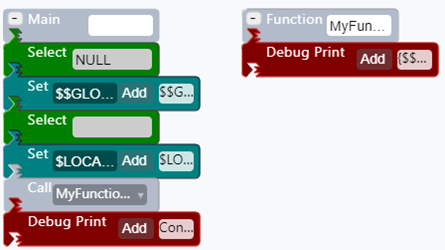
EXAMPLE: Proper use of Call
In this example, the function 'MyFunction' is called by the Main SFCodeBlock.
Example of Call