Exec Analytic
The following table provides information regarding the 'Exec Analytic' SFCodeBlock.
Exec Analytic SFCodeBlock
| Category | Programming |
|---|---|
| Description | Spawn the execution of another analytic that is configured in the Studio project. The selected analytic automatically inherits the current case context and element context according to the configuration. It can run in two modalities: async The current analytic continues the execution and the new analytic is executed in parallel. Additional SFCodeBlocks are allowed to synchronize with the spawned analytic and access its data. sync The current analytic stops its execution until the new analytic completes its execution. Analytics executed in sync behave like functions, but run in a fully independent execution context. When the sync mode is selected, the caller analytic receives the analytic variables allocated by the called analytic, based on the selected Copy Variables settings. |
| Input | None |
| Parameters | None |
| Pattern Support | None |
| Returns | None |
| Configuration | You are required to configure the Exec Analytic SFCodeBlock. To configure the codeblock: 1. Click on the empty label. **Exec Analytic SFCodeBlock  2. Enter your configuration values in the Exec Analytic configuration panel. |
Exec Analytic Configuration Panel
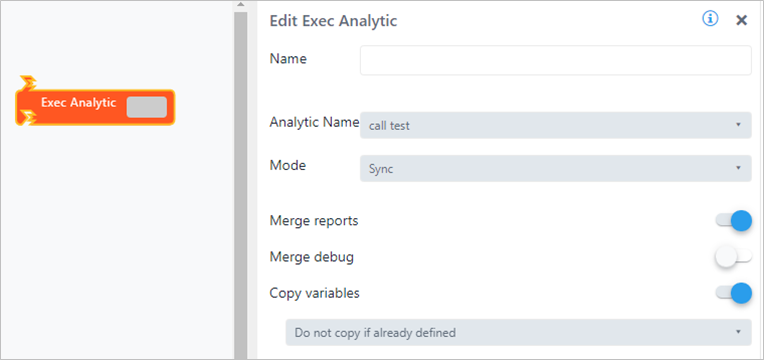
The Exec Analytic configuration panel allows you to choose an analytic and configure how you want it executed. The following table describes the configuration options.
The following table describes the configuration options.
Exec Analytic Configuration
| Item | Visibility | Description |
|---|---|---|
| Analytic name | X | A drop-down list of all the analytics defined in the current Studio project, choose the one of interest. |
| Mode | X | Async A synchronization token is returned; the token MUST be stored in an Analytic variable. The current analytic spawns the execution of the selected analytic, and then continues. Sync The current analytic executes the selected one and waits for its completion. |
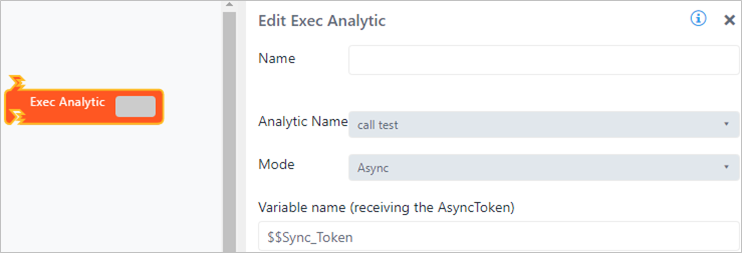
| Variable name (receiving the AsyncToken) | Visible only if Async mode is selected | The analytic variable to be used to store the execution token for further synchronization. |
| Merge reports | Visible only if Sync mode is selected | Enable or disable the merging of the executed analytic report's records with the current report's records collection. If enabled, at analytic completion, all reports' records are automatically added to the current analytic collection. |
| Merge debug | Visible only if Sync mode is selected | Enable or disable the merging of the executed analytic debug records with the current debug records collection. If enabled, at analytic completion, all debug records are automatically added to the current analytic collection. |
| Copy variables | Visible only if Sync mode is selected | Enable or disable the merging of the executed analytic variables, with the current analytic variables collection. If enabled, at analytic completion, all analytic variables are automatically merged. |
| Copy variables option | Visible only if Copy variables is enabled. | The following options are supported: Merge variables content - If the analytic variable is not defined, then it is added. - If the analytic variable is defined, its content is merged. Replace variables content - If the analytic variable is not defined, then it is added - If the analytic variable is defined, its content is replaced. Do not copy if already defined - If the analytic is already defined in the current analytic, it is not copied. |
Example 1
In this example, the analytic spawns the execution of the analytic "call test", and continues the execution.
The synchronization token is returned in the $$Sync_Token variable.
Example 2
In this example, the analytic spawns the execution of the analytic "call test", waits for the completion and then imports report messages and copies analytic variables (distinct mode).