SFCodeBlock Anatomy
SFCodeBlock comes with predefined properties. According to the SFCodeBlock type, some properties may not be available or may have limited functionality.
Connection Ports
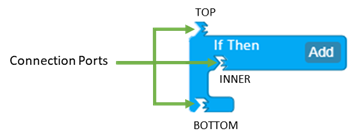
Every SFCodeBlock exposes from one to N connection ports. Connection port can be of type: top, bottom, and inner; every connection port is polarized and enables the connection according to following schema:
TOP - can connect to: Bottom and Inner
BOTTOM -- can connect to TOP
INNER -- can connect to TOP
: Connection Ports
Name
Some SFCodeBlocks require a 'Name' to be assigned to them. One SFCodeBlock that requires a name is:
- Function SFCodeBlock - a name must be assigned to the function
Label (Localization)
SFCodeBlock label is localized according to the User profile setting.
label (Localization)

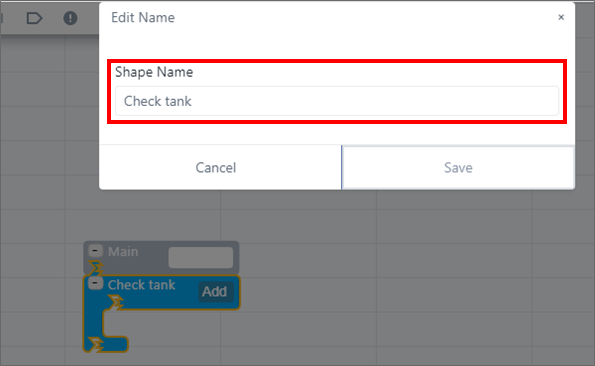
To assign a label to a SFCodeBlock, you change the currently displayed label. Please note that long names should be avoided, as they may be unreadable. The following example shows the If Then SFCodeBlock as being relabeled to Check tank.
If Then SFCodeBlock Renamed to ''Check tank''
Configuration
Configuration takes place through the configuration panel, that is always on the right side of the main panel. Most SFCodeBlocks include their own dedicated configuration panels. However, there are some that do not require configuring and therefore, do not have a related configuration panel. Depending on the SFCodeBlock that you select, you may be required to configure an expression, calculation, printer format, etc.
Template selection only | Single pattern | Multiple patterns |