Case Select
The following table provides information regarding the 'Case Select' SFCodeBlock.
Case Select SFCodeBlock
| Category | SF Case |
|---|---|
| Description | Case Select allows you to change the execution context of the analytic, by switching over to a different case. 1. If the new case is selected, the Working Space is updated with elements referring to the selected case. 2. If, for whatever reason, the case selection fails, misses a case or errors, the analytic executes the code block connected to the inner port (error handling). An analytic may contain multiple Case Select code blocks. If the new case is selected, the Working Space is updated in the following manner: 1. All analytic variables are preserved 2. Element variables referred to element existing in both the current and the new case are preserved 3. Element existing in the new case only, are loaded in the working space 4. Element existing in the current case only, are discarded 5. Transfers of the current case are not preserved, this including all related variables 6. Transfers of the new case are loaded in the working space. |
| Input | None |
| Parameters | None |
| Pattern Support | None |
| Returns | Updated Working Space |
| Configuration | You are required to configure the Case Select code block. To configure the codeblock: 1. Click the empty label. Case Select SFCodeBlock*  2. Enter your configuration values in the configuration panel. 3. Click Save. To handle an error, use the inner port to attach an additional code block. |
The CaseSelect SFCodeBlock is a declarative statement and can be used only in the Main block. It is [not] to be used inside functions or in a Task.
From a performance perspective, we do not recommend using CaseSelect to walk through several cases as, depending on model size and complexity, each case may require significant resources and time for processing.
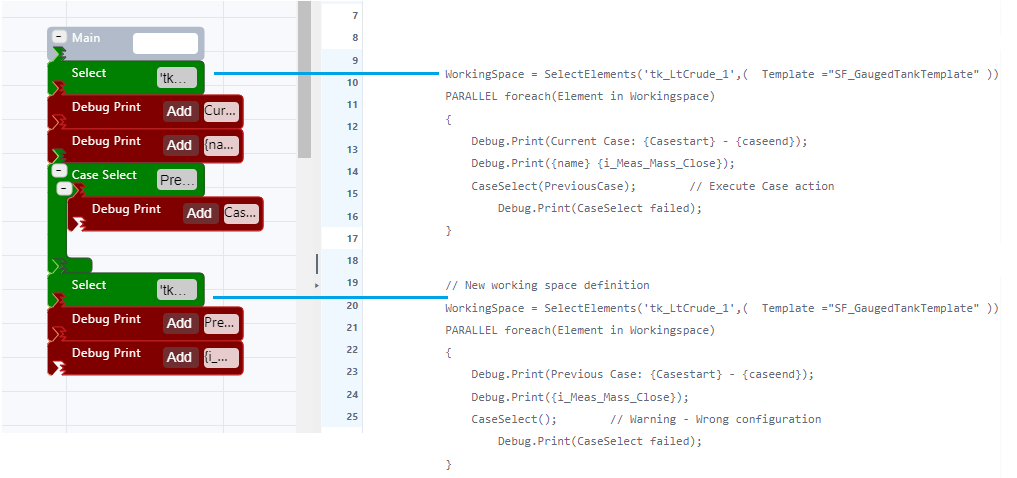
Remember that an eventual Select code block, used to narrow the working space, will be invalidated after the execution of the CaseSelect. This means that if you intend to work with a narrowed working space, then you must execute again the Select code block.
Case Select Configuration Panel
The Case Select configuration panel allows you to configure the case on which to switch the context. The following table describes the configuration options.
| Item | Required / Optional | Description |
|---|---|---|
| Name | Optional | Label name for the Case Select code block. |
| Mode | Required | A drop-down list that allows you to select the Case retrieval mode. Supported modes are based on the following time reference options: Referred to the Analytic execution time - Last Case of the month - Last Case of the previous month - Last Case of the year - Last Case of the previous year - First Case of the month Referred to the selected Case time range - Last Case of the month (selected case) - Last Case of the previous month (selected case) - Last Case of the year (selected case) - Last Case of the previous year (selected case) - Previous Case - First Case of the month (selected case) |
EXAMPLE: Case Select SFCodeBlock Configuration
In this example, the Case Select code block is used to switch the context on the last case of the month referenced to the current analytic execution time. If the selection fails, a message is printed out and the analytic is terminated.
| SFCodeBlocks | Configuration Panel |
|---|---|
 |  |