Action
The following table provides information regarding the 'Action ' SFCodeBlock.
Action SFCodeBlock
| Category | SF Analytics |
|---|---|
| Description | Creates an "Actionable Insight" consisting of writing an attribute value using the value returned by the specified expression. All the "Actionable Insights" created by an analytic are integrated and visible through other SFHub web apps, such as SFHub Visualizer, with the objective to propose a corrective action that you can confirm or reject. The confirmation of an action starts its execution and then the attribute value is replaced according to the Action configuration. |
| Input | AF Element |
| Parameters | None |
| Pattern Support | Yes |
| Returns | None |
| Requisite | Always use Action SFCodeBlock inside of a Report SFCodeBlock |
| Configuration | You are required to configure at least one action pattern. To add an Action pattern: 1. Click the Add button  Since Action supports multiple patterns, you can add as many actions are required. 2. Repeat step 1 for each pattern you want to add. To edit an Action's pattern: 1. Click on the expression placeholder located in the shape. : Action SFCodeBlock - Edit  2. Make the necessary changes in the Configuration panel. |
Action Configuration Panel
The Action configuration panel allows you to configure one of the supported actions. One action per each code block can be configured.
Attribute Tab
Use the Attribute tab to modify the default value of the specified attribute in the AF Database.
Attribute tab configuration
| Item | Required | Description |
|---|---|---|
| Attribute | X | Name of the attribute in which to modify the default value. ::: {.note madcap:autonum="Note: "} If the attribute is configured by a Data Reference, the Write attribute fails. ::: |
| Attribute Value | X | Expression result whose value is used to write the value in the attribute. |
| Unit of Measure | Optional | Unit of measure of the value returned by the expression. If not specified, then it is assumed that the value is according to the default Unit of Measure of the attribute. |
Adjustment Tab
Use the Adjustment tab to create an adjustment in the selected attribute.
Adjustment tab configuration
| Item | Required | Description |
|---|---|---|
| Attribute | X | Name of the attribute in which to create the adjustment. |
| Attribute Value | X | Expression result whose value is used to create the adjustment. |
| Unit of Measure | Optional | Unit of measure of the value returned by the expression. If not specified, then it is assumed that the value is according to the default Unit of Measure of the attribute. |
| Comment | Optional | Free text for the adjustment's comment. |
Clear Adjustment Tab
Use the Clear Adjustment tab to clear the adjustment in the selected attribute.
Clear Adjustment configuration
| Item | Required | Description |
|---|---|---|
| Attribute | X | Name of the attribute in which to clear the adjustment. |
| Comment | Optional | Free text for the clear adjustment. |
Result Tab
Use the Result tab to reset the result stored in the selected attribute.
Result tab configuration
| Item | Required | Description |
|---|---|---|
| Attribute | X | Name of the attribute in which to reset the stored result. |
| Comment | Optional | Free text for the reset of the stored result. |
EXAMPLE: Action SFCodeBlock Configuration
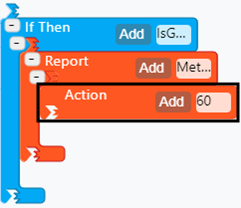
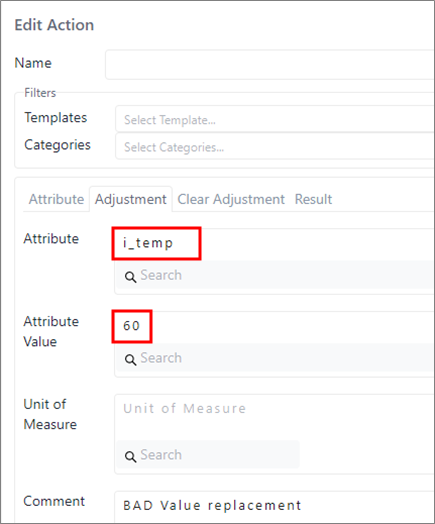
In this example, the Action code block is configured for adjusting the attribute i_temp with a predefined value. Remember that the Action is not executed.
| SFCodeBlocks | Configuration Panel |
|---|---|
 |  |