Auto Expand
Like the Auto Draw, the Auto Expand feature places on the display all connected Elements and the related connectors when dragging the Graphic Symbol.
After an Element is connected to other Elements in the Model, double-clicking on the Graphic Symbol will automatically place on the display the connected Elements as well as the connectors.
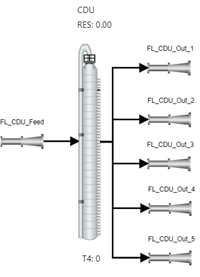
In the example below, the Graphic Symbol is placed on the display.

The double click of the Graphic symbol populates the display with the connected Elements and the related connections and / or attachments.
SFHub will automatically position connected in input Elements on the left and connected in output Elements on the right, user is requested to move or resize them in the display.