Using Special Operators in a Search
Special operators implement dedicated features and can be used to combine multiple search phrases.
Syntax:
\<search phrase>\<special operator>\<search phrase>

Or, depending on the special operator, simply:

Using special operators in a more complex search sentence can help you narrow the scope of the elements returned due to the keyword being used as a filter.
List of Special Operators
| | > | Find all elements connected to the search result set. EXAMPLE: Process1 \|> Searches for all "Process1" matches and then searches for all elements connected to the result set. |
| >> | Find all elements connected in output to the search result set. EXAMPLE: Process1 >>Searches for all "Process1" matches and then searches for all elements connected in output to the result set. |
| << | Find all elements connected in input to the search result set. EXAMPLE: Process1 <<Searches for all "Process1" matches and then searches for all elements connected in input to the result set. |
When searching for a Measurement type (Meter, Analyzer, etc..) the search engine will automatically look for elements connected to the element associated to the Measurement element.
Example: Measure element search

EXAMPLE 1: Using a single "all connected elements" special operator
Let's say you want to detect conditions like this:
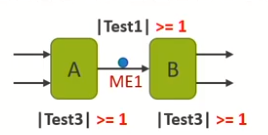
The resulting search sentence would be: Meter Test1 >=1 |> Test3 >= 1
The search engine would:
- Look for all meters having Test1 >=1
- Look for all connected elements having Test3 >=1
The result set would list:
- All meters matching the Test1 >= 1 condition
- All connected elements matching the Test3 >=1 condition
EXAMPLE 2: Using multiple "all connected elements" special operators
Now let's say you want to detect two conditions like this:
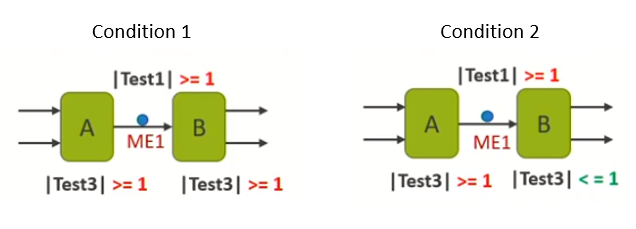
The resulting search sentence would be: Meter Test1 >=1 |> Test3 >= 1 OR (Test3 >=1 OR Test3 <=1)
The search engine would:
- Look for all meters having Test1 >=1
- Look for all connected elements having Test3 matching one of the two conditions
The result set would list:
- All meters matching the Test1 >= 1 condition
- All connected elements matching the Test3 >= 1 OR (Test3 >=1 OR Test3 <=1) conditions