Search Using Built-In Functions
Search feature capabilities can be empowered using the Built-In Functions made available by the SFHub Studio calculation engine. The built-in functions allow to write complex search expressions with the advantage to be transparent from the business rule implemented by the called function.
When a built-in function is used in your search expression, it is recognized and evaluated by the SFHub Search Engine, which applies the expression operator to the result returned by the function.
EXAMPLE: Using Built-In Functions in a search expression
If you wanted to search all the nodes having a reconciled imbalance, then we can use the DeltaStream function in conjunction with the Abs function to get the absolute value to be compared with the operator greater than.
Node Abs(DeltaStream(; ; 'IS' ; 'ObjectStatus' ; 'o_Rec_Mass')) > 0
Below Figure provides an example of the Built-In Functions list. The complete list of the available built-in functions is available in the Search helper.
Functions List example
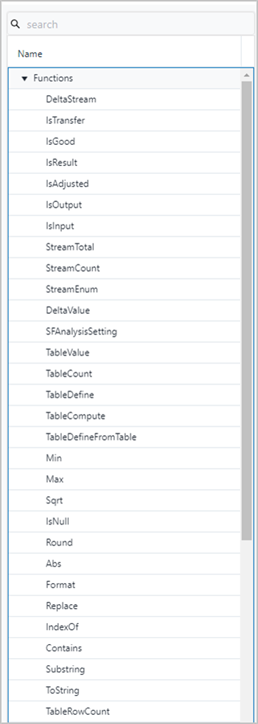
The selection of one of the listed functions creates the function prototype in the search box, where you can declare the required parameters.
The built-in functions and related examples are fully documented under SigmafineHub Expressionsin the SigmafineHub Expressions Guide. Expressions is part of Studio, which is not being release yet. This can be unhidden once Studio is released.