Search for Multiple Elements Using Special Operators
Special operators provide a powerful tool for better data analysis. By combining search phrases with special operators you can more easily identify conditions so you can take proper actions.
The available special operators are:
| Operator | Description |
|---|---|
| |> | All connected elements |
| >> | All elements connected in output |
| << | All elements connected in input |
To search for multiple Elements using special operators:
In the Search box, type the search string using the operators you need to get the results you want.
EXAMPLE: Search for multiple Elements using special operators
Search for multiple Elements using special operators

In lieu of typing the operators, you can roll over the
 Helper icon to select from a list of available expressions,
operators and keywords.
Helper icon to select from a list of available expressions,
operators and keywords.EXAMPLE: Using the Helper to select operators
Select an operator from the Helper list
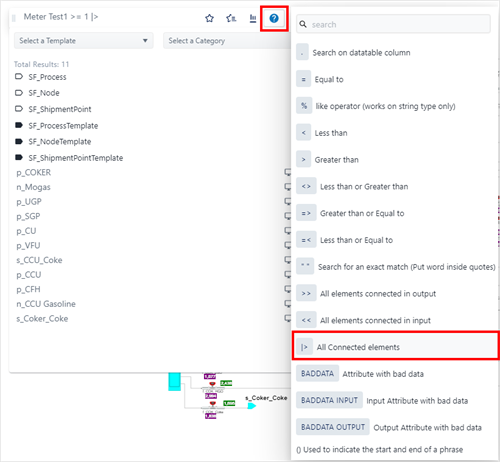
When you finish the search string, the results list changes to display all the elements that match your entry.
Search results
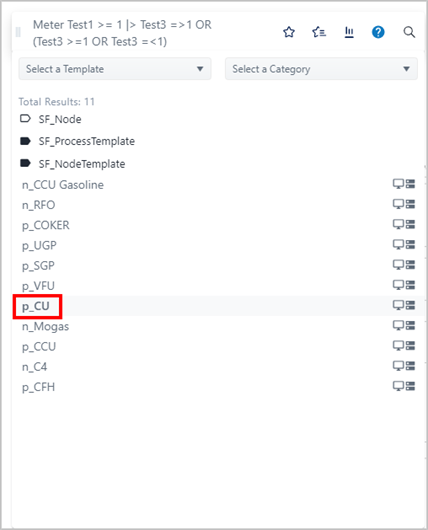
For information about the format of the search results panel, see Search Results Panel.
To select an Element for which you want to view details, click on its name in the results list.
The selected Element is highlighted in the Display panel by a red stick pin.
The Element Detail panel opens, and the stick pin changes to red to indicate that the Element is selected.
To view the Element's details, click on its red stick pin.
The Element Detail panel opens for that Element.