Search for Analytic Insights
The SFHub Search Engine allows you to find insights generated by the analytics. You can search
The SFHub Analytics icon on the Search panel allows to open the list of the configured severities that can be selected to start a search on the elements having an associated insight generated by the analytics.
For more details see SigmafineHub Studio User Guide:
Analytics Usage
SFHub Analytics: ACTIONABLE INSIGHTS
Report SFCodeBlock in SFCodeBlocks Reference
To search for an Analytic Insight:
Click on the SFHub Analytics icon in the Search bar.
[]{#: Search}: Search for Analytic Insights
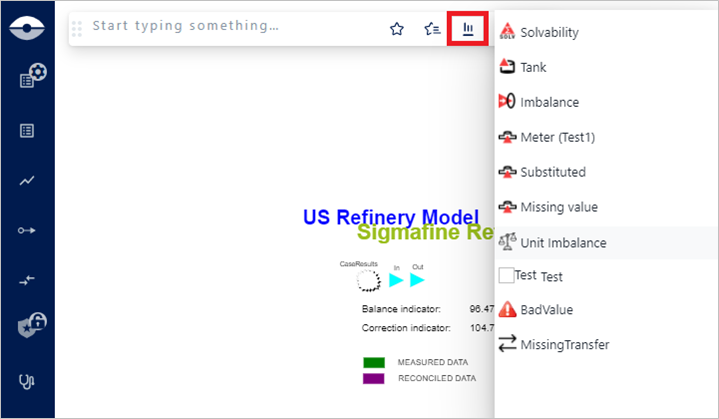
A panel of severities opens, as show in Figure 1.
Click on the severity you want to choose.
The search engine returns all the elements having an insight with the selected severity.
: Example list of Elements containing a selected severity
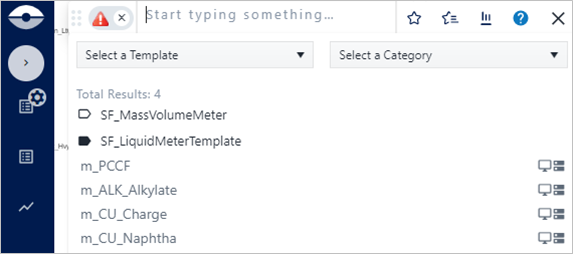
Click on an element to see its insight on the element Tool Tip or in the Element Detail panel.
: Example of Analytic Insight on the Tool Tip panel
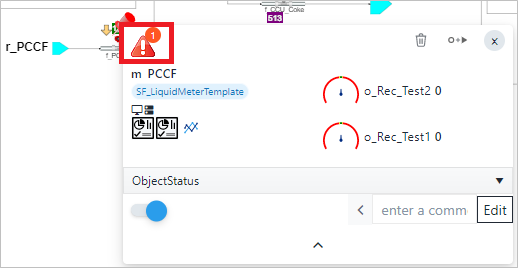
: Example of Analytic Insight on the element Detail Panel

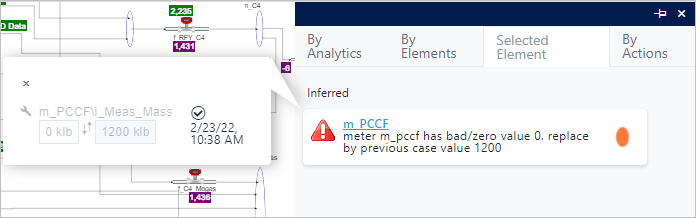
Click on the Analytic Insight icon.
The SFHub Analytic panel opens to the Selected Element tab.
: SFHub Analytic panel - Selected Element tab
Please see SFHub Analytics Panel for more details.