Specify Custom Settings
The Custom Settings tab in the Transfer Entry System Settings window is used to specify the language, the level gauge value to display, the initial start and end times, and to determine the transfer creation permission and transfer information publishing option.
To specify custom settings:
From the menu, select Tasks > Administative Task > TES Settings.
The Transfer Entry System Settings window opens.
Click on the Custom Settings tab to access the custom settings.
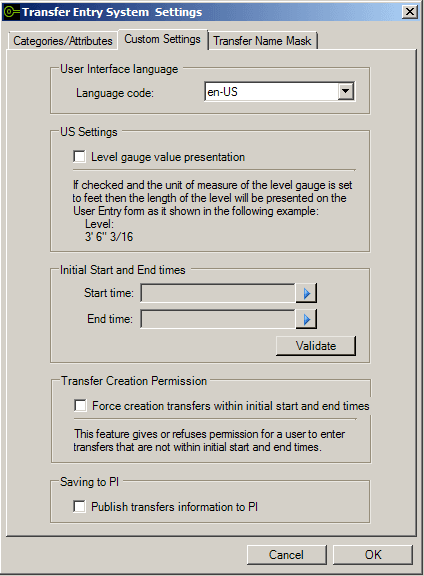
The 'Custom Settings' tab is divided into five sections:
- User Interface language
- US Settings
- Initial Start and End times
- Transfer Creation Permission
- Saving to PI
In the User Interface language section, click on the Language code down-arrow to select the language that the Operator will use in the TES application.
In the US Settings section, check the Level gauge value presentation checkbox if you want tank levels to display in feet and inches.
In the Initial Start and End times section, select Start time and End time values if you want to set initial start and end times to be used by the Operators.
To select these times:
Click on the Start time right-arrow and select the initial beginning time.
Click on the End time right-arrow and select the initial ending time.
Click the Validate button to run a quick process that ensures your selections exist in the database.
In the Transfer Creation Permission section, check the Force creation transfers within initial start and end times only if you want to limit the creation of transfers in between the specific initial start and end times you have set. This setting is applicable only when you have set Initial Start and End times.
In the Saving to PI section, check the Publish transfers information to PI only if you want TES to publish the transfer information to the PI system.
When finished, click OK to save your settings.