Specify Categories and Attributes
The Categories/Attributes tab in the Transfer Entry System Settings window is used to specify which Categories and Attributes are available to the TES Operators for use. The Categories and Attributes that are available depends on the server and database to which TES is connected.
To specify Categories and Attributes:
From the menu, select Tasks > Administative Task > TES Settings.
The Transfer Entry System Settings window opens.
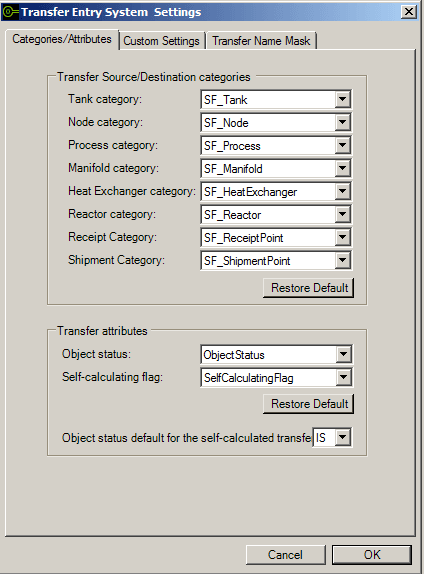
By default, the window opens to the 'Categories/Attributes' tab, which is divided into two sections:
Transfer Source/Destination categories
Transfer attributes
Both sections are automatically populated with the default values found in the database, however, these values can be changed as needed.
To change a default Transfer/Destination categories value, click on its down-arrow and select the value you want.
The 'Transfer/Destination categories' section displays the default categories for tanks, nodes, processes, manifolds, heat exchangers, reactors, receipts and shipments.
To change a default Transfer attribute value, click on its down-arrow and select the value you want.
The 'Transfer attribute' section displays the attributes for the 'object status' and 'self-calculating' features.
To change the default value of Object status for the self-calculated transfers, click on the down-arrow and select the value you want.
When finished, click OK to save your setting changes.