TES Migration Process
The following is the procedure to use when you need to migrate an AF Database that is used by the TES application.
To correctly perform the AF Database migration when TES is installed:
Export the old AF Database to a file, ensuring that you check the Include Unique IDs checkbox.
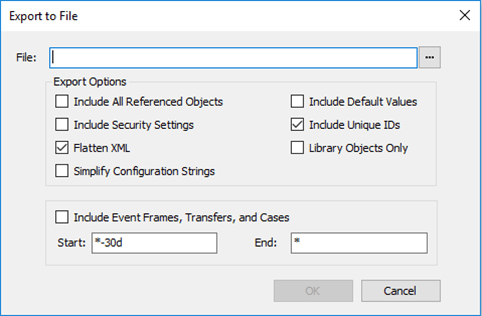
Import the generated XML file into the new AF Database.
Run the TESMaintenance.exe file.
This opens a TES Maintenance window where you select the new server, the new database and the XML file that you had imported into the new AF Database.

Click the AF Server down-arrow and select the new AF Server (the server on which the new AF Database exists).
Click the Database down-arrow and select the new AF Database.
Click the Select File button next to the 'XML File Path' box, to select the location and name of the XML export file from the old AF Database.
Click the Process TES Tables button to complete the process.