Configuring - Spherical Tanks
To use the wizard to do a tank volume calculation for a spherical tank:
Follow steps 1 through 8 under Configuring - Geometric Calculation, then continue with the steps below.
In the Tank Volume From Gauge Data Reference window, select Spherical as the geometric calculation.
The Spherical Tank window opens.
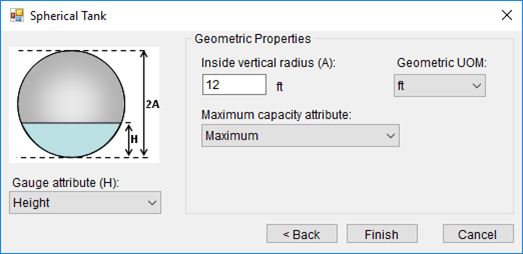
Select the Gauge attribute and Geometric Properties using the following table as a guide.
Spherical Tank
Input Box / Button Description Gauge attribute (H) Select the gauge Attribute to use in the data reference. Geometric Properties Inside vertical radius (A) Enter 1/2 of inside tank vertical height. Geometric UOM Select the unit of measure to use in the data reference. Maximum capacity attribute Select the Maximum Attribute to use in the data reference. When finished with the configuration, click Finish to save the configuration.