PI Point Data Reference
PI Point Data Reference is used to bring in data from data historians into Sigmafine using PI Tags. Following is a brief description and examples of PI Point Data Reference. For more information refer to PI AF User’s Guide.
The following options appear when the PI Points Data Reference window opens:
- Server
- Tag
- Alias or attribute
- UOM
- Retrieval methods
- Time context
- Read / Write
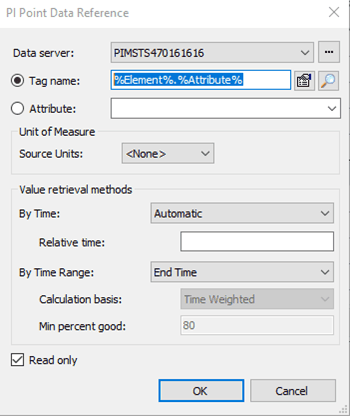
With respect to Sigmafine, the following are the recommended settings for some of the most common elements.
- Meters
- By Time: Not Supported
- By Time Range: Total
- By Case: Time Range
- Density
- By Time: At or Before
- By Time Range: Not Supported
- By Case: End Time
- Levels
- By Time: Interpolated
- By Time Range: Not Supported
- By Case: Start Time (Open) or End Time (Close)
Description of meaning of some of the configurations is given below:
Value Retrieval – By Time – Applies if “By Case= Start or End”. Not supported if “By Case= Time Range”
- After - Returns the first recorded value after the time defined in “By Case”.
- At or Before - Returns the recorded value at the time defined in “By Case”, or if no value exists at that time, the previous recorded value.
- At or After - Returns the recorded value at the time defined in “By Case”, or if no value exists at that time, the next recorded value
- Automatic - Select for a continuous point (step attribute = 0) to be treated as Interpolated; a discrete point (step attribute = 1) is treated as AtOrBefore
- Before - Returns the first recorded value before time defined in “By Case”.
- Interpolated - Returns an interpolated value for the time defined in “By Case”. Discrete points (step attribute = 1) carry the previous value forward.
- Not Supported - Select when individual time values are not supported (By Case=TimeRange).
Value Retrieval - By Time Range – Applies if “By Case= Time Range”. Not supported if “By Case= Start or End”
- Average - Returns the average value of the PI tag over the time range defined by the End Time and the Start Time of the Case.
- Delta - Returns the difference in values between the End Time and the Start Time of the Case. Could be used for totalizers.
- Not Supported - Select when time range values are not supported (By Case=end Time or Start Time).
- Total - Returns the integrated value of the PI tag over the time range defined by the End Time and the Start Time of the Case. Also supports rate (quantity per time) tags.
Value Retrieval - By Case
Automatic - Select to return Time Range value if Time Range context is supported, otherwise return End Time value if Time context is supported.
End Time - Return value at End Time of case. The time context must be supported.
Start Time - Return value at Start Time of case. The time context must be supported.
Time Range - Select to return value using TimeRange method. The time Range method must be supported.
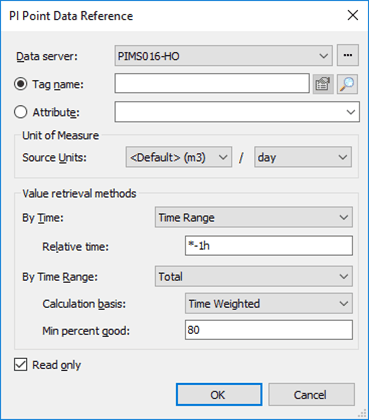
Unit feed is in m3/day
Value is given by a tag
Sinusoid
Continuous time series
For a Case context
Refer to time range
Use the total
Total over Case period
For a time context
Refer to time range
Use relative time *-1h
Total over the last hour