Previous Value Data Reference
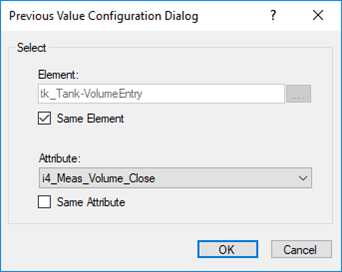
The Previous Value Data Reference provides a convenient way to use a value from an Attribute of any Element from the previous Case into the current Attribute of the current case. The following image is an example of the Previous Value Data Reference configuration window.
The target Attribute containing the Previous Value Data Reference must belong to the SF_CaseInputData category, which can be configured in the relevant Element Template under the Library section. If this category is not assigned, the input result will be created automatically when the data reference is triggered (e.g., during the Collect Inputs step).
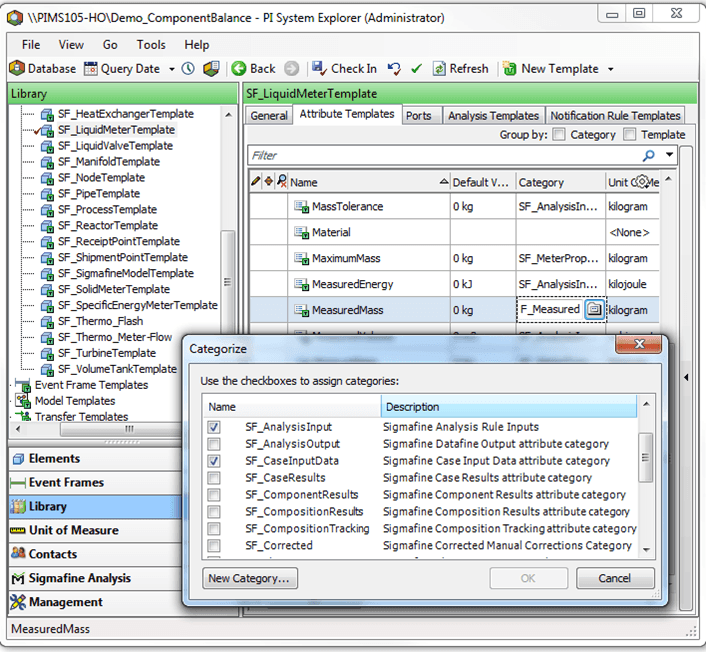
The source Attribute - i.e., the Attribute from which the value is pulled from the previous case - must also belong to the SF_CaseInputData category. If this category is not assigned, the data reference will not work and the following exception will be returned: Previous case element: 'Element name'. The result of the 'Attribute name' attribute was not set.
This constraint ensures that the value being pulled from the previous case is an input value, which is required for the data reference to function correctly. Without this restriction, the system could enter a repetitive loop, traversing all the way back to the first case in the database.
Previous versions of this data reference (SF 4.6) did not enforce this restriction. However, it was and still is strongly recommended to categorize the source attribute accordingly to avoid potential issues.
If you are migrating from an earlier version of this data reference or of the Sigmafine system, this error may occur due to the missing category assignment on the source attribute. To resolve the issue, assign the SF_CaseInputData category to the source attribute.
Note that this may not always be feasible for existing Sigmafine Cases, as it could require repeating the Collect Inputs step. In such cases, the data reference can be configured to bypass the category check for the source attribute.