Using the Steel Data Table
The Tank Shell Calculation references the table SF_SteelData, which is maintained by the modeling database. The table contains different types of steel and the corresponding expansion coefficients.
Adding a new material makes a new selection available from the Sigmafine Data Reference wizard. The table has two columns: Material and Alpha.
- Material – The common name of the steel
- alpha – The linear coefficient of expansion
Material Table
| Material | Alpha |
|---|---|
| Mild Carbon | .0000062 |
| 304 Stainless | .0000096 |
| 316 Stainless | .00000883 |
| 17-4HP Stainless | .000006 |
Adding a Material
To add a material to the Steel Data table:
Open System Explorer.
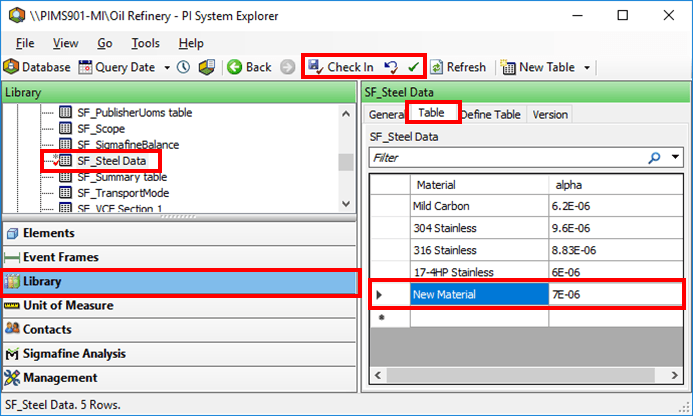
From the navigation pane, select Library.
From the Tables tree, select the SF_Steel Data table.
If not already selected, click on the Table tab.
Click in the Material column at the bottom of the table next to the asterisk (*), to begin adding a new material.
The asterisk indicates a new row in the table. Once you click in the row the asterisk changes to an arrow indicating that you can begin typing in that row.
In the same row, add the new material's alpha (the linear coefficient of expansion).
On the toolbar, click the Check In button to save the new material.
The new material will now be available in the "Tank Shell Correction Factor" window.