Library Property Panel
The Library property Panel allows view and select the available graphic template libraries as well as build new libraries or create a copy of them.
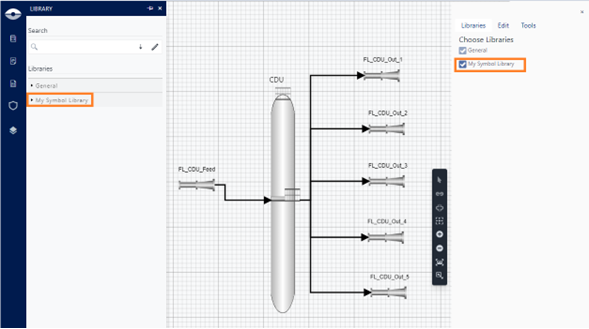
The Library Property panel opens by clicking on the Symbol libraries icon on the command bar to show the general and custom libraries currently selected:

Click on the search box to activate the functions on the right-side panel.

Libraries Tab
Located on the right panel, this tab allows the user to select the symbol libraries, General and custom, used on the authored display.
Depending on the authoring session type, the list of selectable symbol libraries changes:
- Display not connected to Sigmafine server: Generic symbol library and Whiteboard symbol library.
- Display connected to Sigmafine server: Generic symbol library and Custom library associated with the Server and Database.
Edit Tab
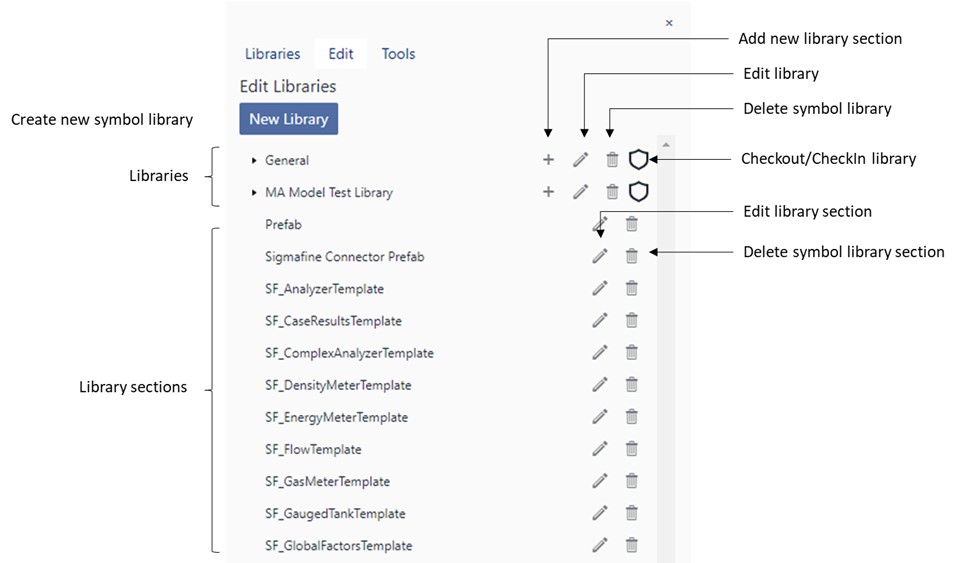
Symbol libraries are fully customizable both in terms of structure (sections) and in terms of contents. Below the panel and the supported features:
Tools Tab
The library property panel makes available a set of tools for the maintenance of the symbol�s libraries. The tools tab allows to:
Library Verification
Check the consistency of a Graphic Template symbol library against the Sigmafine Elements templates.
Verifying a library allows the user to detect potential inconsistencies that may occur when Sigmafine Elements templates and Attributes are changed in the Sigmafine database and may affect the library configuration.
Graphic Templates defined in a library have a strong reference with the respective Sigmafine Element templates defined in the Sigmafine database as well as all the annotations of each Graphic Template may have a strong reference with the Sigmafine Attribute template.
Any change made on the Sigmafine database like create, delete, or rename a Sigmafine Element template as well as create, delete, or rename attribute templates, may cause side effects on the libraries linked to that database.
Library Copy
Copy a library bound to a Sigmafine database to a different server or database to reuse the Graphic Templates you defined in a different context.
Library Import
Coming soon.
Library Export
Coming soon.