SOA Publisher Dataset
The SOA Publisher Datasetis not a true Dataset, but rather a method used to wrap existing Datasets and expose them to external SOA Clients, in order to be called for third party systems. Multiple datasets can be exposed at the same time, with each dataset represented by a specific SOAP method containing its input parameters and output value(s). This capability allows grouping the exposed Datasets in a single Service/Dataset.
In order to use SOA Publisher Dataset, a valid SOA Publisher Connector must already be defined, as the SOA Publisher Dataset acts as a SOAP method of the SOA Server defined in the Connector. This connector uses the same security schema defined in the belonging SOA Publisher Connector.
Rules for Running an SOA Publisher Dataset
- The SOA Publisher Dataset uses the standard Microsoft Windows Communication Framework (WCF) implementation for communicating and activating the services, sending, getting and parsing data.
- The XML representation of the data returned by this Dataset depends on the data and data types returned by the selected source Dataset. Therefore, only those objects and types that can be serialized by XML are allowed.
- Each Input parameter to a SOA Listener call supports only the following types:
- Standard system types (string, float, double, integer, boolean, datetime… etc)
- Supported Output data types are:
- Standard system types (string, float, double, integer, Boolean, datetime… etc)
- Arrays of standard system types
- Structures and array of structures built only with standard system types
- Standard .NET XML DiffGramm (default table representation in .NET)
Defining 'SOA Listener Publisher' Parameters
When you add or edit an SOA Publisher Dataset, a Portal Data Source definition window opens in which you define all the parameters for the dataset.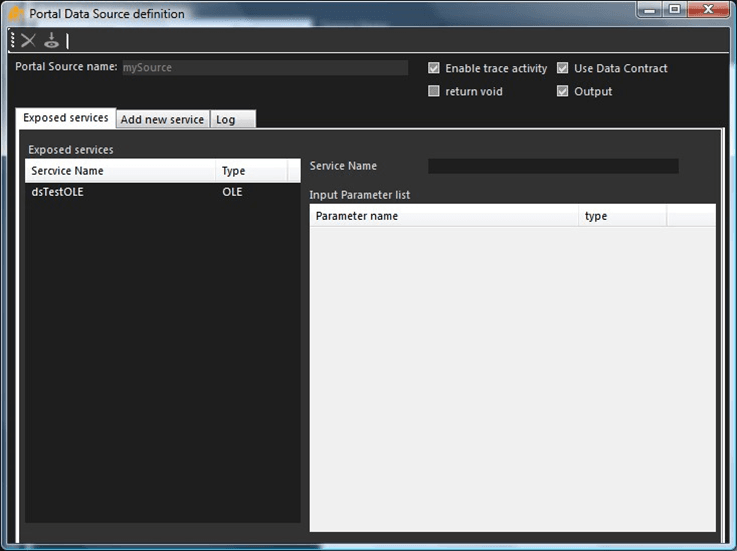
The window is divided into two sections; the top section contains the Portal Source Name along with a series of check boxes and the bottom contains three tabs:
Portal Source Name and checkboxes:
The following table provides descriptions for the options found in the top section of the Portal Data source definition window.
Three tabs:
The following is an explanation of the tabs found in the bottom section of the Portal Data Source definition window.
- Exposed services tab: Contains the main parameters for the SOA Connector source. This is the tab you use to define/edit the parameters for the SOA Listener Dataset.
- Add new service tab: Displays the main statistics of a running SOA Listener Dataset. Each time the SOA Dataset is called by an external SOA client or system, the number of received messages is updated. For more detailed information, see Accessing SOA Listener Message Statistics.
- Log tab: Allows you to search and display the trace messages generated for the SOA Publisher Connector. Traces/Logs are packed by “executions” or “calls”. This means that a new set of trace/logs messages is created each time a call is invoked for the selected SOA Publisher. For more detailed information see, Search & Display SOA Publisher Trace Messages.
To define SOA Listener Dataset parameters:
Use the following table as a guide to define the options you want to choose.
Portal Data Source definition Options
Option Description Portal Source name The name of the SOA Publisher Connector associated with this Dataset. This is a system parameter that is not editable. Enable trace activity When checked, this checkbox enables the tracking for this dataset. If unchecked, trace message management is disabled. Use Data Contract When checked, this checkbox enables the "WCF Contracts" usage.A Data Contract is a formal agreement between an SOA service and an SOA client that abstractly describes the data to be exchanged. This means that to communicate, the client and the service do not have to share the same types, only the same data contracts. A data contract precisely defines, for each parameter or return type, what data is serialized (turned into XML) to be exchanged.Windows Communication Foundation (WCF) uses a serialization engine called the Data Contract Serializer by default to serialize and deserialize data (convert it to and from XML). All .NET Framework primitive types, such as integers and strings, as well as certain types treated as primitives, such as DateTime and XmlElement, can be serialized with no other preparation and are considered as having default data contracts. Many .NET Framework types also have existing data contracts. Complex types (data structures) customized by users must have a data contract defined for them to be serializable, so this option must be turned on. return void When checked, this checkbox enables the empty response. This checkbox is used in special Case when the response of the SOAP method must return an empty reply to the caller. Usually this option should be disabled (unchecked). Output When checked, this checkbox enables the output to the caller, in order to return a valid XML response (SOAP message) to the caller Click on the Exposed services tab if it is not already selected.
This tab displays a list of the services exposed by this dataset. Each exposed dataset is one method. The list is composed of two columns:
Service Name: The name of the dataset, which is the Integration Framework dataset internal name created by the user for the type of dataset.
Type: The type of the dataset (see the possible dataset types; OLE, FILE, etc.)
If you are defining a new Publisher Dataset, you may need to add a new service to the list.
To add a new service to the Publisher Dataset, see the steps under Publishing a Dataset Example.
To view the input parameters for an exposed service, select the Service Name from the list.
The Service Name appears on the right of the list, along with a list of its Input parameters.
In the toolbar, click the
 Save icon to save the options you have selected.
If you want to add a new service, please see the steps under Publishing a Dataset Example.