Publishing a Dataset Example
The following procedure is an example that shows how to publish an already defined OLEDB Dataset in an SOA environment through the SOA Publisher Dataset; and how to call the Dataset from an SOA Client.
In the Portal Data Source definition window, select the Add new service tab.
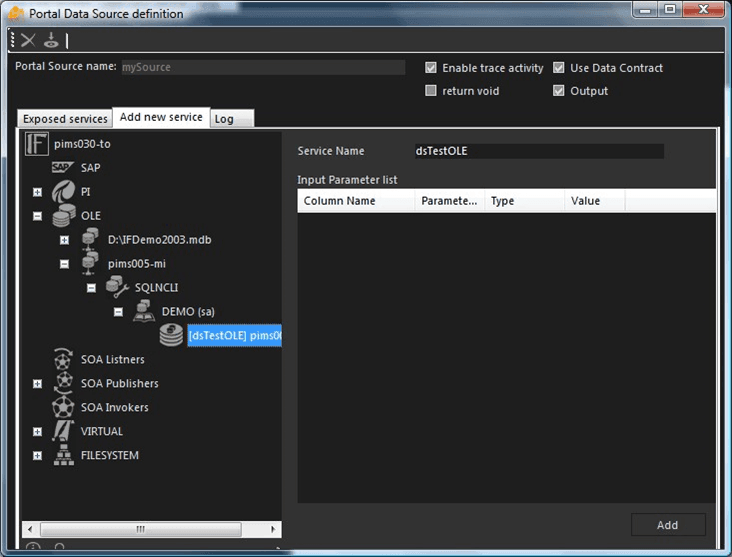
From the tree in the left side, browse to and select the needed dataset to be exposed.
Once selected, the dataset name is highlighted in the Service Name box on the right side of the window. Should input parameters already exist for the dataset, they appear in the Input Parameter list on the right side of the window.
Click the Add in the bottom right corner, in order to confirm the selection.
Click on the Exposed services tab again, to see the selected dataset.
Test the SOA exposure.
Run the SOA Publisher Connector.
Open a new instance of Internet Explorer.
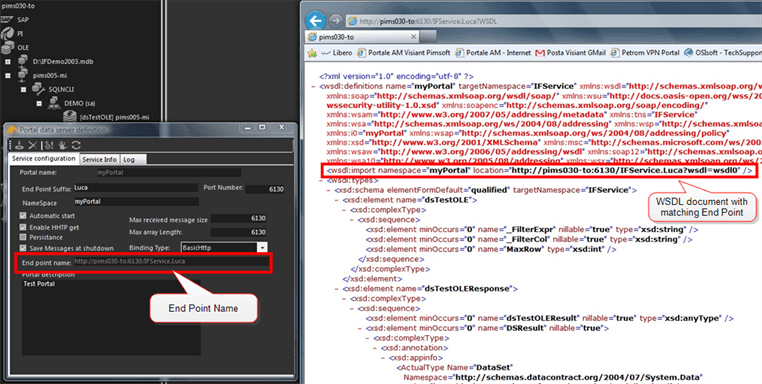
Browse to the URI defined in the 'End Point Name' of the SOA publisher with the extension "?WSDL" in order to get the WSDL document.
If the browser outputs the Web Service Definition Language XML document, the DataSet is ready to be used by a SOA-enabled client.
 EXAMPLE: New SOA Publisher Dataset