Configurator
The Integration Framework Configurator is a client/server tool that lets you configure the Integration Framework main engine. The tool is installed with the standard client setup of Integration Framework.
Configurator Interface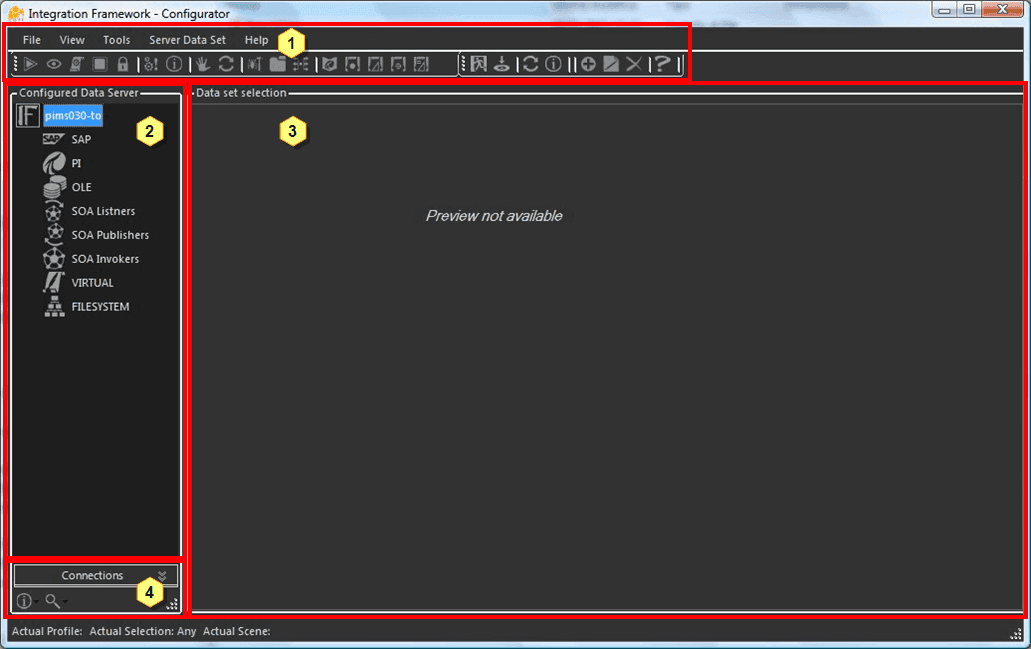
The Configurator tool interface is divided into four sections:
| 1 | IF Menu & Toolbar | This section contains all the command/action button for Integration Framework. |
|---|---|---|
| 2 | Storage Tree View | This section contains a tree-view that lets you easily navigate the data structure of Integration Framework. The tree is organized in different levels. Fore more details see Storage Tree View Organization. |
| 3 | Working Area | This is the main working client area. All the tool windows are loaded in this space. Depending the object selected in the main Storage Tree View, this area is automatically populated or rendered according to that selection. |
| 4 | Status Bar | This bar displays the actual status of the application and exposes the following commands:Connection: Opens the quick connection display (calls the connection to the IF Server).Info: Displays some information about the connection status and errors.Magnifier: Changes the browsing behavior of the tree. |