FILE Dataset
The FILE Dataset is used to extract a set of specific files from a file-system already connected through an Integration Framework FILE Connector. In order to use the FILE Dataset, a valid FILE Connector must already be defined and at least one valid file should be available to use. For further information about the definition and parameters for FILE Connector, please see FILE Connector.
Defining 'FILE Dataset' Parameters
When you add or edit a FILE Dataset, a configuration window automatically opens. This is the window in which you are to define the dataset's parameters.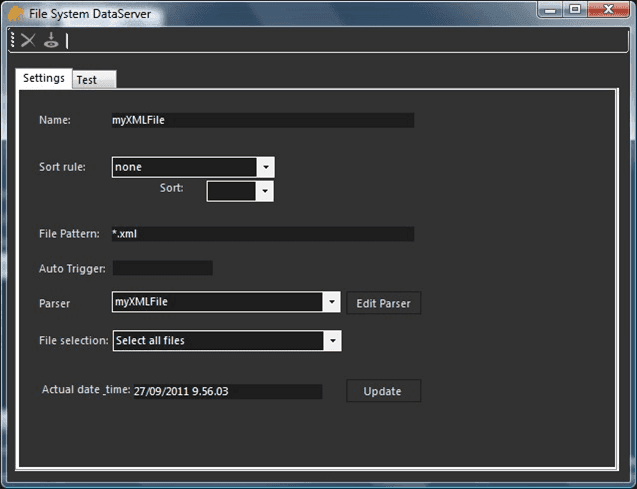
To define the FILE Dataset parameters:
Use the following table as a guide in entering the parameters for the FILE Dataset.
Integration Framework FILE Dataset Parameters
Parameter Notes 'Settings' tab Name (Required) The name of the Dataset.You must specify a name before saving it. Sort rule Allows you to set the file sorting rule; It determines how Integration Framework should sort the retrieved files from the FILE Connector.\<None>: No sortingLast Update Date: Sort files by file last update date and time.Write Date (Creation): Sort files by file creation time date or time.File Name: Sort the files by name using the same operating system sorting rules Sort Used in conjunction with the “Sort rule,” it defines the sorting order of the rule selected “Sort rule.” This parameter is not needed when '\<None>' is selected as the "Sort rule." File Pattern Allows you to set the file filtering rule, which is a standard file pattern-search following standard file patterns in Microsoft Windows rules. The file filtering rule determines how Integration Framework filters the retrieved files from the FILE Connector. It is used to extract a specific subset from the same file system location connected through the FILE Connector. In this way you can have a unique file repository position, but with different rules for managing the filesIMPORTANT: There is no logical check by Integration Framework for this rule, therefore we recommend that you play close attention to how you setup this rule. This is a sub-filter over the main filter defined by the FILE Connector. For instance, if the FILE Connector has been configured with file pattern = .DAT, and this filter is .TXT, the system will return an empty list. Auto trigger Future use. Leave this box empty. Parser Allows you to select a data-extraction rule from the available list of parsers for the files in the list. All the files returned by this Dataset are processed with the parsing-rules defined in this rule. The rule determines how Integration Framework parses the retrieved files from the FILE Connector. File selection Allows you to set the File Selection rule, which determines how Integration Framework selects or picks up the retrieved files from the FILE Connector. It only works with a list of files as opposed to a single file. There are two possible File Selection options:Select all files: When selected, it returns all the files in the subset.Select last file: When selected, it returns only 1 file; the latest file in the list. Actual date time Allows you to set the working date and time. This option should be used in conjunction with the “File selection” rule. This parameter is used on the 'Test' tab to test the output according to the different system timestamps. By forcing this parameter, you can simulate a Dataset call with a specific time (in the future or in the past), without waiting or changing the Integration Framework machine date and time. The Update button sets the time. 'Test' tab Test (button) The Test button on the Test tab runs the Dataset in order to have a preview of the results (see Notes About Testing.) Click on the Test tab.
Click the Test button on the right to test the dataset connection.
In the toolbar, click the
 Save icon to save your parameter settings.
Notes About Testing
The Test tab in the File System DataServer window lets you preview the file-list retrieved by the FILE Dataset. The list of files are returned according to the rules defined in the dataset applied in the following order:
- FIRST: File Filtering
- SECOND: File Sorting
- THIRD: File Selection
 EXAMPLE: Sample Test for an XML File
The following figure displays a sample test for an XML file.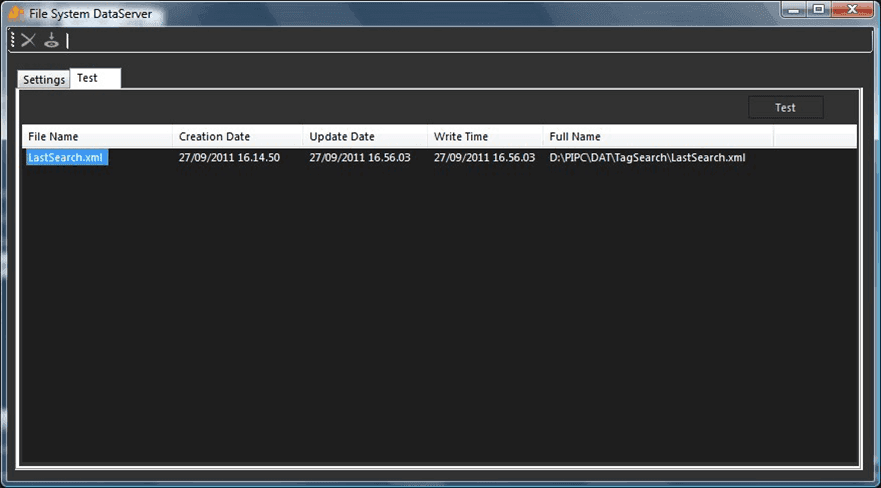
If an expected file is not listed, there could be different causes:
- The file has been locked by the operative system.
- Integration Framework has no 'Read' rights for the folder and/or file(s).