Removing a Dataset
When you remove an existing Dataset, you are essentially deleting a query or request to an external system, and disabling a basic building block for the Integration Rules. Since datasets are the base blocks for Integration Rules, removing a dataset alters all the Integration Rules using that dataset.
Prior to removing a Dataset, we recommend you verify that:
All Integration Rules are not using the target Dataset.
If an Integration Rule is using the Dataset, it is mandatory to edit the Integration Rule in order to remove the Dataset usage.
All AF Data References are not using the target Dataset.
If an AF Data Reference is using the Dataset, it is mandatory to edit the configuration of the DR in order to remove the Dataset usage
IMPORTANT: While we provide the means to remove a dataset, we strongly discourage doing so unless the necessity is due to a trivial error in the initial dataset step (e.g. just a preliminary test over a similar server).
Note: If you need to remove a Dataset that is used inside one or more Integration Rules, please refer to the Removing a Dataset used by Integration Rules section below.
To remove an existing Dataset:
Run the Integration Framework Configurator.
Click on your Windows Start button to display the list of installed software applications.
From the list of software applications, select Integration Framework > Configurator.
The Integration Framework - Configurator window opens.
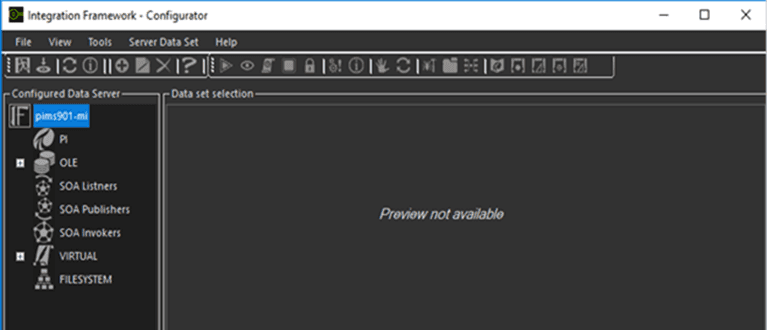
From the Configured Data Server list, locate the Dataset you need to edit.
Right-click on the Dataset and select Remove.
Click the
 Save icon in the toolbar to save the removal and close the window.
Removing a Dataset used by Integration Rules
If you need to remove a Dataset that is used as the basis for one or more Integration Rules, you must do the following:
- Prior to removing the Dataset, stop all the Integration Rules using that Dataset, by disabling all the triggers associated to the Integration Rule(s).
- Also prior to removing the Dataset, stop all the AF Clients using the Pimsoft Integration Rule Data Reference.
- After editing the Dataset, edit and test all the Integration Rules using the edited Dataset.
- Restart all the Integration Rules that you had stopped by re-enabling the trigger objects. In some special Cases you must restart the Integration Framework Server in order to apply the changes. This is required because some special objects can remain in memory and need to be downloaded again in order to take effect.