SOA Invoker Dataset
The SOA Invoker Dataset is used to connect to a Web Servie. It uses a SOA method from a list of available methods from the SOA Provider. In order to use the SOA Invoker Dataset, a valid SOA Invoker Connector must be defined and the WSDL interface must be able to parse and process the Web Service definition. The SOA Invoker Dataset uses the credentials defined in the associated SOA Invoker Connector object you select. For further information about the definition and parameters for the SOA Invoker Connector, please see SOA Invoker Connector.
Note: Before creating and running a SOA Invoker Dataset, we strongly suggest that you test the Web Service method with a browser in order to verify the parameters and the data format are used and returned.
SOA Invoker Dataset Defining Rules
Please keep the following information in mind as you define the parameters for the SOA Invoker Dataset.
- The SOA Invoker Dataset uses the standard Microsoft .NET SOAP protocol implementation for communicating and activating the Web Services and sending, getting and parsing data. Only those objects and types that can be serialized by XML are allowed.
- Due to standard XML representation, custom classes cannot be fully supported, therefore there are some methods that cannot be invoked with this Dataset.
- The output of the Web Service method, in terms of data type and format, must be unique. Different types and blob objects are not allowed.
- Each Input parameter to a SOA Invoker call supports only the following types:
- Standard system types (string, float, double, integer, Boolean, datetime… etc)
- Supported Output data types are:
- Standard system types (string, float, double, integer, Boolean, datetime… etc)
- Arrays of standard system types
- Structures and array of structures built only with standard system types
- Standard .NET XML DiffGramm (default table representation in .NET)
- Input parameters can also be returned as output parameters or values. Check your Web Service documentation for output parameter management.
Parameter Name Rules
\<parameter name\>has some limitations:- It cannot be a XML marker or keyword or a name already used in the objects (e.g. a parameter/Attribute name or another specific reserved keyword, like “XML”, “\</>”… etc)
- It cannot contain any special characters, such as: * . , : ; @ # $ ! ” ‘ ? ( ) & % / \ ^ [ ] { } \< >
- It cannot be a pure-numeric value (e.g. 123). Names like “Prm_123” are ok
- The same parameter cannot be reused. Use a unique identifier for each parameter. Note though, that the same parameter name in different datasets is allowed.
- Pay attention to the management of datetime formats in XML. The standard XML format is YYYY-MM-DDTHH:mm:ss.nnn (e.g. 2011-09-24T12:27:55.000)
Defining 'SOA Invoker Dataset' Parameters
When you add or edit a SOA Invoker Dataset, a Configure IF Source window opens displaying the 'Methods' tab.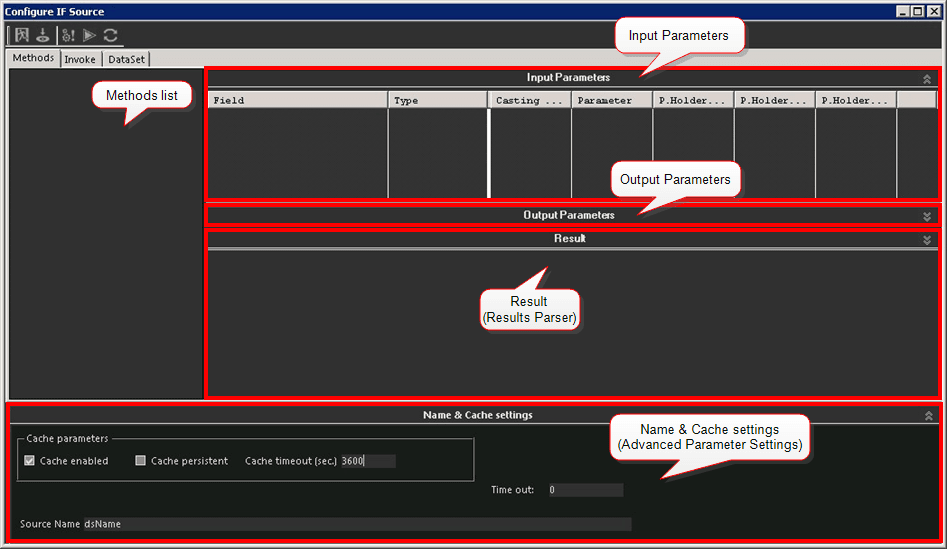
The Methods tab displays a list of all the methods from the available Web Service that were discovered by the SOA Invoker Connector. The window itself is divided into three tabs; Methods, Invoke and DataSet. Only the Methods tab is used for defining the dataset parameters.
Methods tab: Used to define the dataset parameters. it is divided into the following four sections:
Methods list: This section displays a list of all the available Web Service methods discovered by the SOA Invoker Connector that was run for the Dataset. From this list you select the Method(s) to run for the Dataset you are defining.
Input Parameters: Displays a row for each input parameter found by the WSDL interface.
Output Parameters: Displays a row for each output parameter (parameters in the Input calls that are returned as Output values) found by the WSDL.
Result (Parser section): Displays the resulting XML response in hierarchical format, fitting XML specifications. In this section, you can browse and navigate the XML structure of the XML response packet returned by the Web Service. This is most helpful for when you want to perform a deeper analysis of the data. See Results Parser for more details.
Name & Cache settings (Advanced Parameter Settings): Located below the Results section, this section displays the advanced parameters and the name of the dataset. See the Advanced Parameter Settings table for more details.
Invoke tab: Displays the parsing results of the XML reply received from the Web Service method.
DataSet tab: Displays the results of the Web Service call, providing there are no SOAP parsing or Web Service execution errors.
 EXAMPLE: DataSet tab displaying results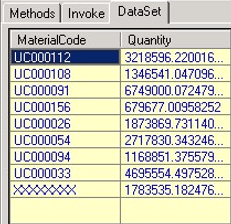
To define the SOA Invoker Dataset parameters:
From the Methods tab list, select which method(s) to run for the dataset you are defining.
As you select methods, the dataset automatically populates the Input Parameters, Output Parameters and Results sections of the window.
Use the following Input Parameters table to edit the Input values if needed.
Please keep in mind that certain values are not editable, as noted in the table.
Input Parameters
Input Value Description Field (Read Only) Displays the parameter name. Type (Read Only) Displays the type of the parameter (e.g. string, integer, datetime, etc.) Casting This is the casting rule. You can cast the value of the parameter on-the-fly (see column 'P.Holder Value') and force it into the type of the parameter (see column 'Type'). Parameter Identifies the type of parameter to be used when calling the Web Service. There are different options, but for a standard call, it should be set to 'KeyField'. P.Holder Name A symbolic name used for the parameter. Basically this value is a mandatory alias for Integration Rules. In Integration Rules, you do not see the SOAP/XML parameter name (the name in the 'Field' column), instead you see this alias name. P.Holder Value The value of the parameter. In an Integration Rule, this will be the default value used for this Dataset. P.Holder Format For numeric and DateTime types only, this field sets the format of the parameter. Use the following Output Parameters table to edit the values if needed.
Please keep in mind that certain values are not editable, as noted in the tables.
SOA Invoker Dataset: Methods Tab - Output Parameter Values
Input Value Description Field (Read Only) Displays the parameter name. Type (Read Only) Displays the type of the parameter (e.g. string, integer, datetime, etc.) Recast Enables data recasting, so that the 'Casted Field Name', 'Casted Field Type' and 'Casting Expression' columns are taken into consideration. Casted Field Name Enables data recasting so it takes the associated recasting columns into consideration. Casted Field Type Enables data recasting so it takes the associated recasting columns into consideration. Casting Expression Enables data recasting so it takes the associated recasting columns into consideration. Parameter Identifies the type of parameter to be used when calling the Web Service. There are different options, but for a standard call, it should be set to 'KeyField'. P.Holder Name A symbolic name used for the parameter. Basically this value is a mandatory alias for Integration Rules. In Integration Rules, you do not see the SOAP/XML parameter name (the name in the 'Field' column), instead you see this alias name. P.Holder Value The value of the parameter. In an Integration Rule, this will be the default value used for this Dataset. P.Holder Format For numeric and DateTime types only, this field sets the format of the parameter. Use the following Advanced Parameter Settings table to edit advanced parameters.
This is also the section in which a Dataset 'Source Name' must be entered when creating a new SOA Invoker dataset.
Advanced Parameter Settings
Parameter Description Cache enabled (Optional) When checked, this checkbox enables the cache manager for the selected dataset. Cache persistent (Optional) When checked, this checkbox enables the persistence of the cache. Cache persistence is cache that is permanently stored through a file.The cache is created only in the following cases:The first time the Web Service call or method is executed. (A change in the WSDL specifications or in parameter values causes the recreation of the cache).Every time the IF Server is restarted. However, the associated file for the cache is not present (deleted). Note that the cache file cannot be deleted when the IF Server is running. Cache timeout (Optional) Indicates the time span until the data cache's validity expires.Possible settings are:> 0: The number of seconds before expiration occurs. After the number of seconds is reached, the cache is destroyed. The cache is rebuilt when the first call is made after the expiration has occurred.<=0: Indicates that there is no expiration (unlimited). The cache is rebuilt only during the first activation or when Integration Framework is restarted. Max rows to collect (test) Indicates the maximum number of rows to be returned in the preview area.An entry of "0" is used when you want all rows to be returned. Time out Indicates the maximum number of seconds to wait for a call or method execution. Source Name (Required) The name of the Dataset. You must specify the name before you can save the dataset. In the toolbar, click on the
 Test icon to test the dataset and be able to preview the results on the DataSet tab.
In the toolbar, click the
 Save icon to save your parameter settings.
Results Parser
The Result section of the SOA Invoker Dataset displays the resulting XML response in hierarchical format, fitting XML specifications. In this section, you can browse and navigate the XML structure of the XML response packet returned by the Web Service. This is most helpful for when you want to perform a deeper analysis of the data.
Based on the type of the response from the Web service methods, the structure can vary. Usually though, there are three scenarios:
Simple object: this structure is a unique XML node containing the type of the result and the value
Array of objects: this structure is a two-level XML hierarchy structured in the following way:
\<arrayname Parameter1=”value1”, Parameter2=”value2”…\>\<arraynode1 Parameter1=”value1_1”, Parameter2=”value1_2”…\>\</arraynode1\>\<arraynode2 Parameter1=”value2_1”, Parameter2=”value2_2”…\> \</arraynode2\>\<arraynode3 Parameter1=”value3_1”, Parameter2=”value3_2”…\>\</arraynode3\>………\<arraynodeN Parameter1=”valueN_1”, Parameter2=”valueN_2”…\> \</arraynodeN\>\</arrayname\>Complex results XML document: this format depends on the type of XML returned by the Web Service methods. For .NET Datasets the representation is the standard XML Diffgramm, as shown in the following example.
