SOA Invoker Connector
The SOA Invoker Connector is used to call different kind of SOA data sources acting as a SOA client. Therefore, this connector can be used only to invoke any method exposed by a SOA server. Integration Framework supports the following SOA compliant systems:
- Microsoft Web services
- Microsoft .NET Web Services (ASMX)
- Microsoft WCF (Windows Communication Foundation) Services
- Oracle/Java Web Services
- PHP Web Services
- Other W3C-compliant technology for building Web Services
In order to use an SOA Invoker Connector, and SOA server (e.g. Web Services) must be up configured, running, and available prior to configuring the connector. Also prior to configuring the connector, we strongly recommend that you test the Web Service URL and the loading of the standard Web Service WSDL with an Internet browser (You can then just copy and paste the URL link); and verify that the credentials to connect to the Web Service has enough rights to access the requested services and data.
The SOA Invoker Connector implements the following:
- HTTP/HTTPS connection protocol (no other protocol is supported)
- Different authentication modes (see below for details)
- SOA Data Source interface graphical browsing
- SOA Data Source manual interface upload
The SOA Invoker Connector supports the Web Services Description Language (WSDL) in order to interact with the Web Service in a manner prescribed by its description using SOAP messages, typically conveyed using HTTP or HTTPS protocol with an XML serialization. This version of the SOA Invoker Connector supports WSDL 1.1 and 2.0.
Defining 'SOA Invoker Connector' Parameters
When you add or edit a SOA Invoker Connector, a Configure SOA Invokers window opens.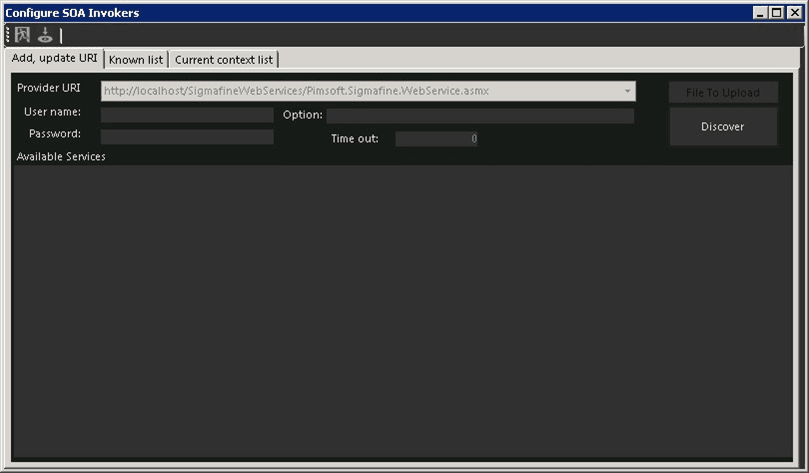
In this window, you can define the SOA Invoker connector to connect to a SOA data source using either a:
- Valid HTTP/HTTPS URL
- XML file containing the WSDL specifications
When using a valid HTTP/HTTPS URL, the SOA Invoker tries to connect to the target URI (using the given credentials) and then it calls the WSDL parser, in order to automatically discover the Web Service interface getting the SOAP methods and data/format specification. Results are automatically displayed in a graphical tree format.
When using a XML file containing the WSDL specificatons, the SOA Invoker Connector loads the XML file which activates its internal WSDL parser in order to automatically discover the Web Service interface. Like a standard XML Web Service, the results are displayed in graphical tree format.
To define the SOA Invoker Connector parameters:
- In the Provider URI box, do one of the following:
To use a valid HTTP/HTTPS URL, type the URL address in the box.
To use an XML file containing the WSDL specifications, click the File to Upload button to open a window in which you can find and select the XML file. Note that The real Web Service URL can be inside the WSDL file.
Note:
The "URI" is the main parameter to connect to the data source. (A valid http/https URL or an XML file that contains the WSDL interface.) It should reflect the location of the Web Service / SOA Provider
Currently, Integration Framework does not support UDDI calls to discover Web Services, but the direct path of the Web Service must be provided.
Use the following table as a guide for entering the proper settings for the User name, Password and Options boxes.
The table provides a list of the Authentication Modes supported by the Integration Framework SAO Invoker Connector and the parameters settings to use based on each mode.
SOA Invoker Connector Parameters Based on Supported Authentication Mode
Authentication Mode Description and Notes Anonymous Access Allows connecting to the SOA web service as specified in the URI, without using authentication.In this Case the anonymous authentication is used. Set the parameters as follow:User name: (leave the box empty)Password: (leave the box empty)Option: (leave the box empty) Basic Authentication Allows connecting to the SOA web service as specified in the URI with the basic authentication (standard W3C specifications). This method is used for Web Service interoperability with Java or PHP Web Services, since the Integration Framework SOA Invoker is a .NET XML client. Set the parameters as follow:User name: Enter the account name.Password: Enter the password for the account name.Option: (leave the box empty) Windows Authentication Allows connecting to the XML Web Service hosted over Microsoft IIS. This method allows using Windows Authentication relying on Windows Security defined in IIS. Set the parameters as follow:User name: Enter the Windows account name.Password: Enter the password for the Windows account name.Option: Enter the Windows Domain name (Machine or Company domain). In the Time out box, type the connection timeout for the selected Provider URI.
Click the Discover button.
If no error is displayed and the graphical WSDL browser tree is populated, then save the Connector.
In the toolbar, click the
 Save icon to save your parameter settings and close the Configure PI window.
 EXAMPLE: Link to a .NET Web Service with the SOA Invoker Connector
How to link a .NET Web Service with SOA Invoker Connector
If you were to configure the SOA Invoker Connector to get the connection with an XML Web Service build using the Microsoft .NET Framework, you would perform the following steps.
Open the Integration Framework Configurator tool.
Add a new SOA Invoker Connector.
In the Provider URI box, type the Web Service URL (the http-path of the ASMX file).
Set the credentials in the User name, Password and Option boxes (for further details see the Authentication Modes section below)
Set the Time out parameter.
Click the Discover button.
If no error is displayed and the graphical WSDL browser tree is populated, then save the Connector.
Click the Save icon.