Connecting an In/Out Port
To connect an In, Out or Undirected Port:
Open ProcessBook.
Click on the Elements tab.
Double-click on the Flow Element to open the 'AF Property' window for that element.
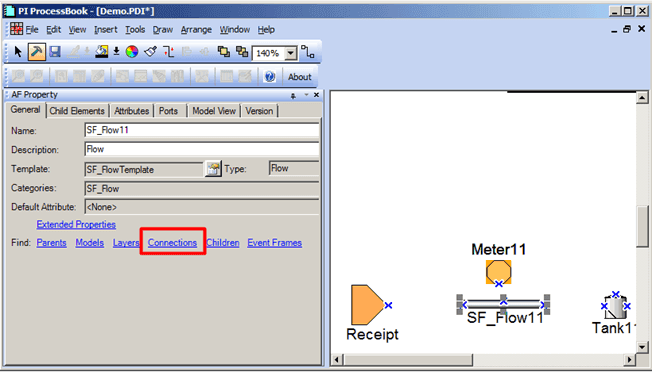
Click on the Connections link.
The Element Connections window opens.

Click on the In port of the flow (as shown in the figure above).
The Make Connection window opens.
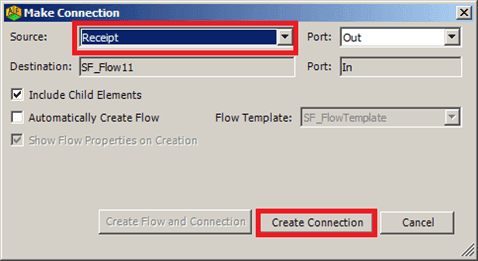
Click on the Source down-arrow and select the source element.
Click the Create Connection button.
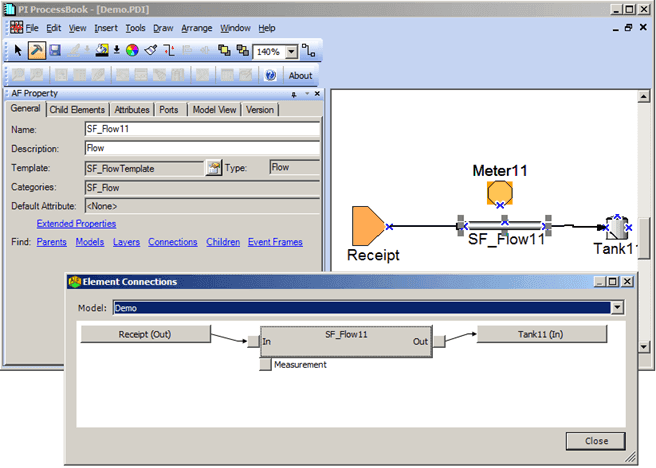
The Make Connection window closes, and you are returned to the Element Connections window where you can see that the connection is created between the two elements, as shown in the following figure.
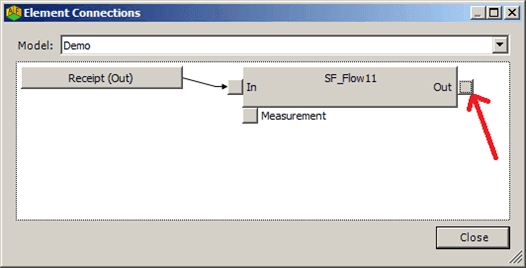
Click on the Out port of the Flow (as shown in Figure 848).
The Make Connection window opens again.
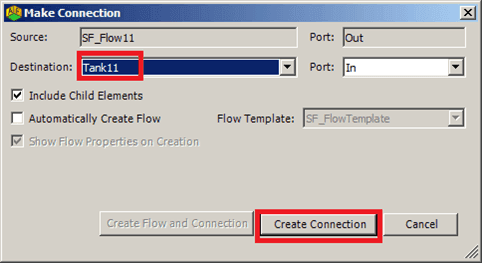
Click on the Destination down-arrow and select the destination element.
Click the Create Connection button.
The Make Connection window closes, and you are returned to the Element Connections window where you can see that the connection is created between the two elements in both the Element Connections window and in the Display pane of ProcessBook (as shown in the following figure).
In the Element Connections window, click Close to exit the window.