Parameters Tab
The Utility & Settings window Parameters tab allows you to configure all of the working parameters of Sigmafine IMM. We recommend using the IMM Configuration application to configure the parameters.
To configure working parameters:
Click on the
 Settings button to open the Utility & Settings window.
Click on the Parameters tab to display the parameters configuration.
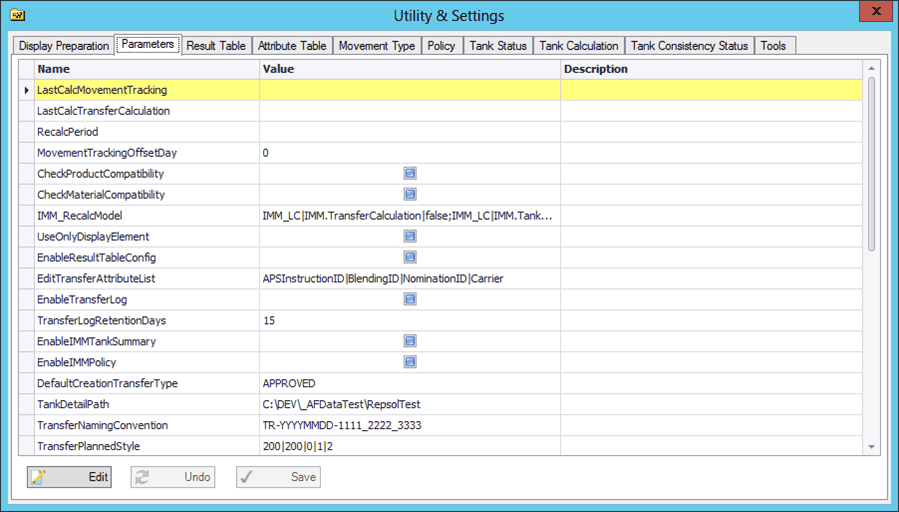
Click on the Parameters tab to display the parameter configurations.
Click the Edit button to allow for editing of value configurations. See Edit the ‘EditTransferAttributeList’ Parameter for special instructions on editing this parameter.
Make your value configuration changes.
Click the Save button to save your changes.
If you do not wish to save your changes, click the Undo button.
Edit the ‘EditTransferAttributeList’ Parameter
You can edit the ‘EditTransferAttributeList’ parameter so that it allows you to customize the list of transfer attributes that can be modified in the transfer edit window.
To edit the EditTransferAttributeList parameter:
In the ‘EditTransferAttributeList’ row, click in the Value column.
A drop-down list is opens, showing the attributes you can choose (see following figure):
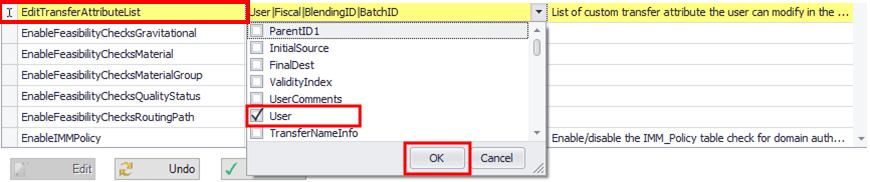
Check the box next to the value you want to choose.
Click OK to save your choice and close the drop-down list.
A Mandatory Attributes window opens.

Check the attribute(s) that you want to be mandatory.
Click OK to save your choice(s) and close the Mandatory Attributes window.