Tools Tab - Composition Tracking Init
The Composition Tracking Init feature on the Tools tab allows you to initialize the composition table for the tank and pipeline.
To initialize the composition table:
Click on the
 Settings button to open the Utility & Settings window.
Click on the Tools tab to display the Composition Tracking Init tab.
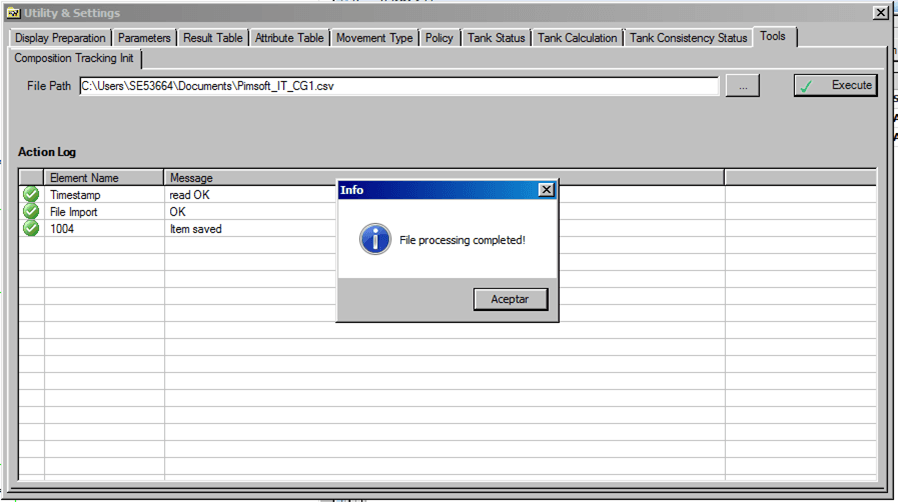
In the File Path box, type the path to the .csv file that contains the component configuration, or click the
 (ellipsis) button to locate and select the file.
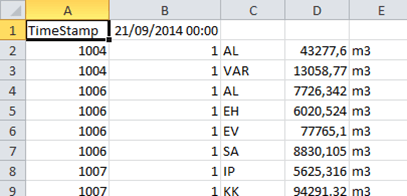
The selected .csv file must match the following format:
Row 1, column A should contain the word "TimeStamp" and column B should contain the end time-stamp in
mm/dd/yyyy 00:00format.Row 2 and all remaining rows should contain the following data:
Column A: Tank name
Column B: Sequence number of the material packet
Column C: Material code
Column D: Mass, according to the Unit of Measure of the attribute 'ReconciledMass'
Column E: Not meaningful
 EXAMPLE: File Format when Displayed in Notepad
 NEED A NEW SCREENSHOT THAT IS ALL IN "ENGLISH" - THE CURRENT ONE SHOWS ENGLISH AND SPANISH.
Click on the Execute button to start loading the composition.
When the process completes, an Info message window opens stating that the file processing has completed (as shown in Figure 1647).
Click OK in the Info message window to close it.
The log containing the processing information is displayed.