Adding the IMM Add-In to ProcessBook
The Sigmafine IMM Add-in can be added in ProcessBook by following the same procedure as that for the AF Modeler Add-In. The procedure is described in the following steps.
To add the IMM Add-In to ProcessBook:
Open ProcessBook.
Go to Tools > Add-In Manager to open the Add-In Manager window, as shown in the following figure.
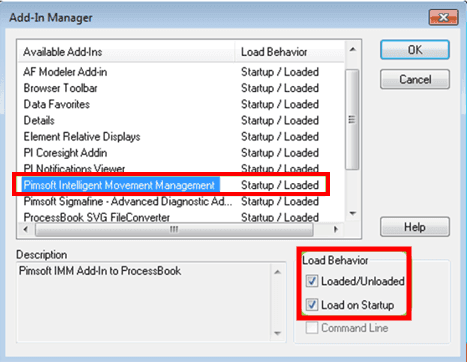
Verify that the Pimsoft Intelligent Movement Management is visible in the list.
The addition of the add-in occurred at the time you walked through the installation process described in IMM Client Install.
Check the Loaded/Unloaded checkbox, if it is not already checked.
Check the Load on Startup checkbox, if it is not already checked.
Click OK to save the settings and close the Add-In Manager window.
When the IMM Add-in is loaded, the IMM toolbar is available in ProcessBook ( the toolbar is shown in the following figure).

If the IMM Add-In 'Dockable Window' is not immediately visible:
- Select View > Sigmafine IMM Add-In from the PI ProcessBook main menu.