Load Library Files
The ADA library can be loaded on a new or empty Sigmafine database from the set of libraries that have been previously saved in the PI AF System, by using the following procedure.
To add the ADA library file:
From the System Explorer menu, select File > Load Library, as shown in the following figure.
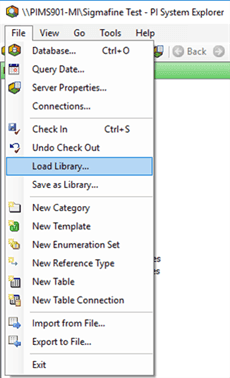
The Load Library into Database window opens.

Select the Sigmafine ADA library.
If the Sigmafine ADA library is not yet loaded in your PI AF System, you can import it directly into your database. See Import the Library into the Database
Click OK.
Import the Library Into the Database
To import the Sigmafine ADA library directly into your database:
In the navigation pane, select
 .
.The Library pane opens.
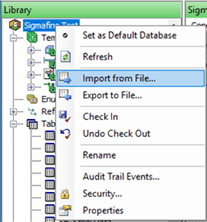
Right-click on the root folder and select Import from File.
A standard file Open window opens.
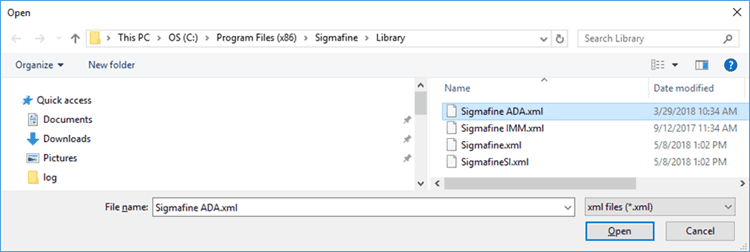
locate the
Sigmafine ADA.xmllibrary and select it.Click Open.
This action imports the library directly into the database you have selected in System Explorer.