AF Table: SFDiag_Lang_XX
With the release of version 4.5.3, the SFDiag_Lang_XX AF Table was created to contain the language setting based on the regional setting of the computer being used. When the Sigmafine Advanced Diagnostic Add-In (SF-ADA) is loaded, it checks for the existence of the SFDiag_Lang_XX table. The in the table name 'XX' is replaced with the language being used. Available languages are:
- EN - English
- IT - Italian
- ZH - Simplified Chinese (Only available in ADA 4.7 SP1 or later)
Note: Support for additional localizations can be made available whenever a new SFDiag_Lang_XX is created.
If the regional setting found on the computer is not one of the above, the 'English' version is loaded by default.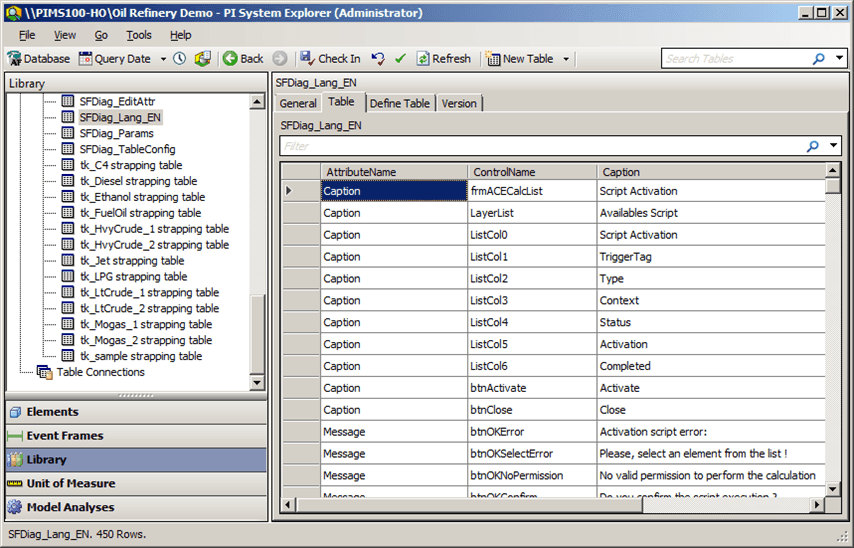
The SFDiag_Lang_XX table displays a list of all the parameters for which the text is translated to the language set on the computer.
The following table explains the SFDiag_Lang_XX parameters and their settings.
SFDiag_Lang_XX Table Columns
| Column Name | Description |
|---|---|
| AttributeName | Indicates the type of text that gets translated to the language of the computer being used. The types are:Caption: Typical for a command button.Message: Error and warning message box.Tooltip: Message that explains a toolbar button function.Attribute name values are not editable. |
| ControlName | Indicates the name of the interface control known to the SF-ADA application.Control name values are not editable. |
| Caption | Indicates the name of the control as it appears in the interface.Each Caption value can be edited if you want to change the label that appears for the control in the interface.For example, if a control displays the word 'Type' as its label in the interface, but the control is actually for selecting a classification, you could change the control's label in the Caption column from 'Type' to 'Classification'. From that point forward, that control's label would display the word 'Classification' instead of the word 'Type', in the interface. |