Customize Object Info Settings
You customize Object Info settings in SF-ADA by saving them to the PI AF Database, in the Attributes template configuration. This is done by adding Attributes to the either the 'Attribute Info' or 'Balance Info' panes in the Object Info window. Once saved, the Attributes for the selected template are automatically assigned to the appropriate category, ('BA_GetInfo_Attribute' or 'BA_GetInfo_Balance').
To customize Object Info settings from the Result table in ProcessBook:
In the Result table, do one of the following to access the Object Info window:
Use the SF-ADA toolbar:
Select an Element in the SF-ADA Results window, or select a symbol of an Element in the ProcessBook display.
On the SF-ADA toolbar, click on the
 Get Object Info button.
Use the right-click menu:
Right-click on an Element in the SF-ADA Results window, or on a symbol of an Element in the ProcessBook display.
Select Object Info from the menu that appears, as shown in the following figure.

The Object Info window opens.
To customize Attributes assigned to the BA_GetInfo_Attribute category, use any of the following set of steps.
Right-click anywhere in the 'Attribute Info' pane to display a menu of options.
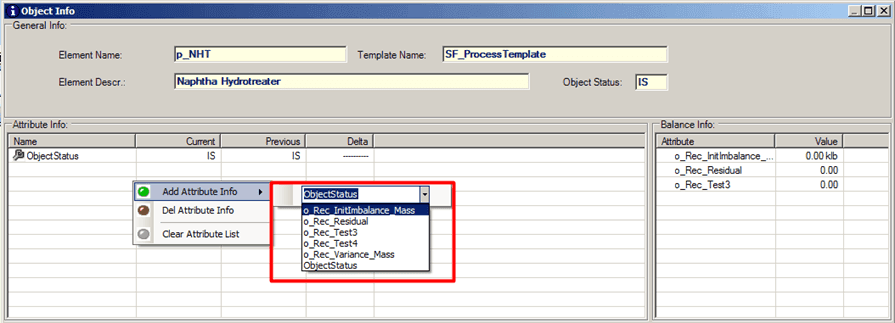
Click on the Add Attribute Info option.
A list of available Attributes opens (as shown in Figure 1120).
Select the Attribute you want to add.
Repeat the steps for each Attribute you want to add.
In the 'Attribute Info' pane, right-click on the Attribute you want to delete, to display the menu of options.

Click on the Del Attribute Info option.
Repeat the steps for each Attribute you want to delete.
Right-click anywhere in the 'Attribute Info' pane to display a menu of options.
Click on the Clear Attribute List option.
To customize Attributes for the BA_GetInfo_Balance category, use any of the following set of steps.
Right-click anywhere in the 'Attribute Info' pane to display a menu of options.
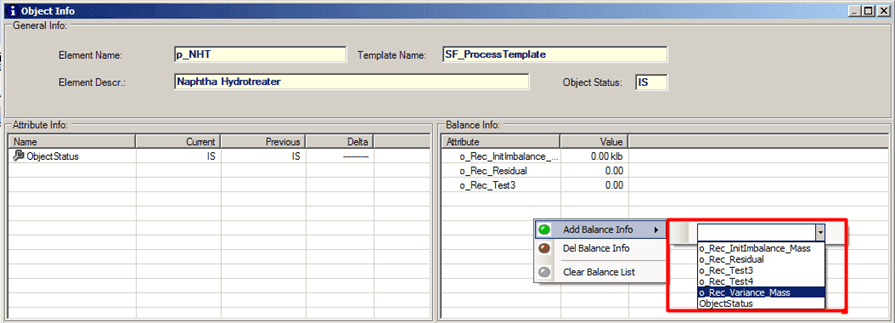
Click on the Add Balance Info option.
A list of available Attributes opens (as shown in Figure 1123).
Select the Attribute you want to add.
Repeat the steps for each Attribute you want to add.
In the 'Balance Info' pane, right-click on the Attribute you want to delete, to display the menu of options.

Click on the Del Balance Info option.
Repeat the steps for each Attribute you want to delete.
Right-click anywhere in the 'Balance Info' pane to display a menu of options.
Click on the Clear Balance List option.
To see the changes reflected in the SF-ADA Results table, click the
 Sigmafine Result button.
 Add an Attribute Info attribute