AF Table: SFDiag_EditAttr
The SFDiag_EditAttr AF table contains the list of elements Attributes and all the settings. This is the table in which the Format ranking rules are saved.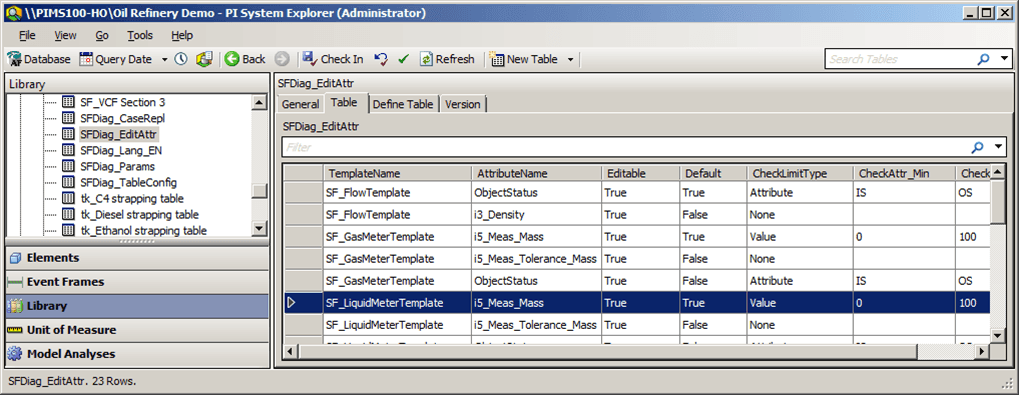
The following table provides column settings and descriptions that are displayed in the SFDiag_EditAttr table.
SFDiag_EditAttr Table Columns
| Column Name | Description | |
|---|---|---|
| TemplateName | The Name of the Element template. | |
| AttributeName | The Name of the Element template editable attribute. | |
| Editable | Indicates whether or not the template Attribute is editable. Setting are True or False. | |
| Default | Indicates which Attribute is the default. Only one Attribute can be set as the default. When the Edit Value window opens, the corresponding row is selected. | |
| CheckLimitType | When you create a new value, this setting allows you to check if the value is between a valid minimum and a valid maximum, depending on which value you select. | |
| None | No check limit is applied when you edit the Attribute value. | |
| Attribute | A Check Limit is applied and the minimum and maximum are indicated in the Element attributes. | |
| Tag | 'Zero' and 'Span' in the tag configuration are considered the minimum and maximum. | |
| Value | Minimum and maximum can be set manually. | |
| CheckAttr_Min | Only used with CheckLimitType = Attribute;. It indicates the Attribute name of the minimum value. | |
| CheckAttr_Max | Only used with CheckLimitType = Attribute;, It indicates the Attribute name of the maximum value. |
For instructions on editing the Attribute configuration see Edit the Attribute Configuration.